
In Brief
Regular WiFi is typically managed locally through individual routers, access points, or on-site controllers, while Cloud WiFi centralizes management through an online platform. This makes Cloud WiFi better suited to multi-location businesses that need remote administration, consistent guest access policies, centralized reporting, and easier network expansion.
What’s the Difference Between Cloud WiFi and Regular WiFi?
In brief: Regular WiFi and Cloud WiFi both provide wireless internet access. The main difference is how the network is managed. Regular WiFi is usually configured locally through a router, access point, or on-site controller. Cloud WiFi uses a centralized online platform to manage locations, devices, guest access, users, security policies, and network activity remotely.
For a guest connecting a phone or laptop, Cloud WiFi may look almost identical to regular WiFi. The user selects a network name, enters a password or completes a login page, and connects to the internet.
For the business operating the network, however, the difference can be significant.
Regular WiFi may be sufficient for a home, small office, café, or single venue with basic requirements. Cloud WiFi becomes more valuable when a business manages multiple locations, provides guest access, needs centralized reporting, or wants to control the network without being physically present at every site.
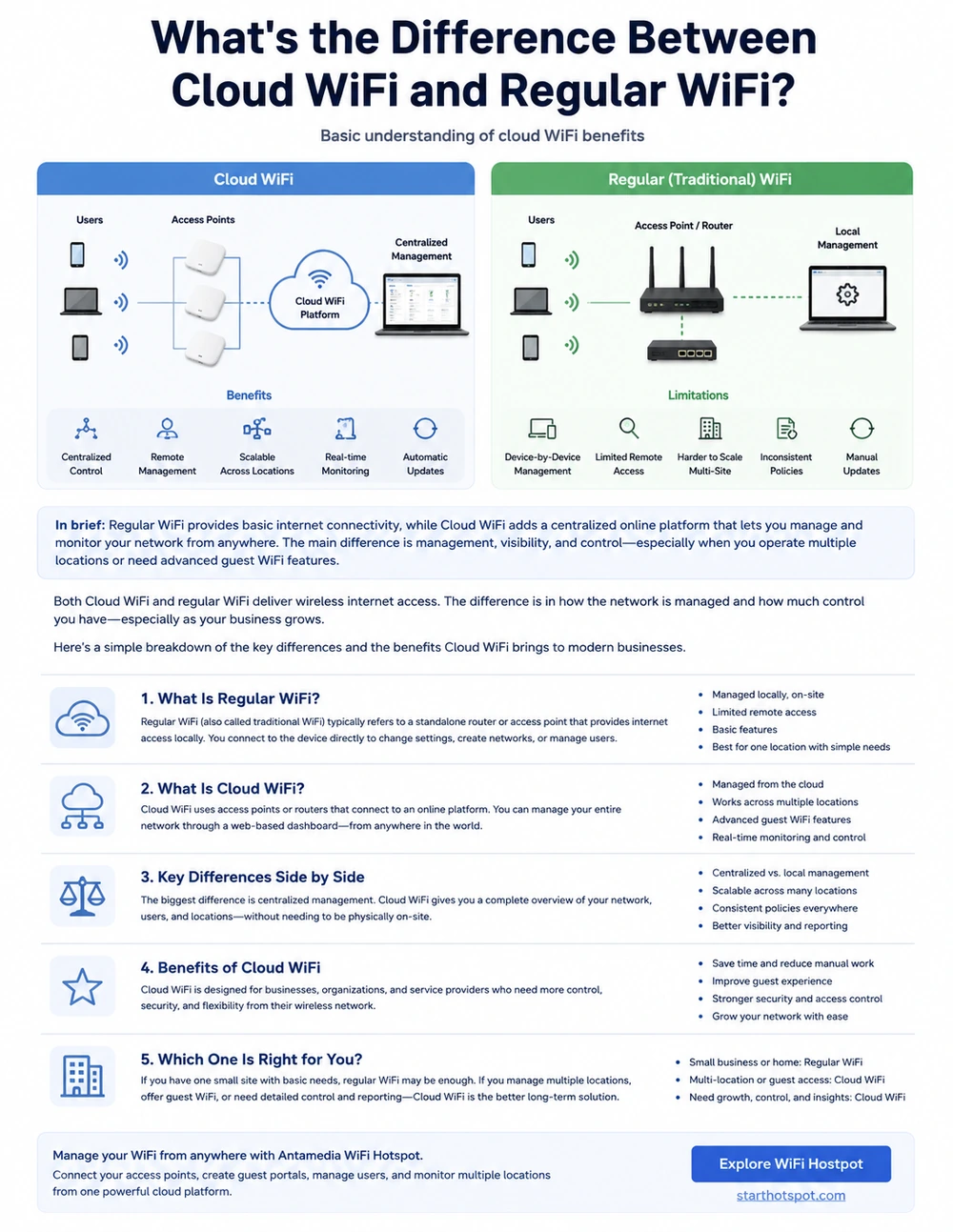
Both Cloud WiFi and Regular WiFi Use Physical Equipment
The term Cloud WiFi can create the impression that the wireless signal comes from the cloud. It does not.
Both regular and Cloud WiFi require physical network equipment at the location, including:
An internet connection.
A router or network gateway.
One or more wireless access points.
Network switches and cabling where required.
Correct access point placement.
Local firewall and network configuration.
The access points at the venue still generate the WiFi signal and connect user devices to the local network.
The cloud platform provides the management layer.
This means Cloud WiFi does not replace routers, access points, switches, bandwidth, or proper network design. A poorly positioned access point, overloaded internet connection, incorrect VLAN, faulty cable, or weak firewall configuration can still cause problems.
The difference is that Cloud WiFi gives the administrator a centralized way to view, configure, and manage the network.
What Is Regular WiFi?
Regular WiFi usually refers to a network that is configured and managed locally.
In a basic setup, an administrator connects directly to a router or access point, creates a WiFi network name, defines a password, and changes settings through the device’s local interface.
A larger network may use an on-site WiFi controller to manage several access points within the same building.
Regular WiFi can work well when:
The business has one location.
Only a few access points are installed.
The network rarely changes.
Local technical staff are available.
A shared WiFi password provides sufficient access control.
Detailed guest authentication is not required.
Centralized reporting and analytics are not important.
The limitations become more visible as the network grows.
When each location has its own router, password, administrator account, and configuration, the central IT team may not have a complete overview of the network.
A simple change may require logging into several devices separately or asking local employees to update the settings.
Over time, different locations can begin operating with inconsistent passwords, outdated configurations, different access policies, or undocumented local changes.
What Is Cloud WiFi?
Cloud WiFi moves the management and service-control layer to a centralized online platform.
The routers, access points, switches, and internet connections remain at the physical location. Authorized administrators manage the WiFi service through a web-based dashboard.
Depending on the platform and connected network equipment, administrators may be able to:
View multiple locations from one dashboard.
Monitor routers, access points, and connected users.
Manage guest login pages.
Configure user accounts and vouchers.
Apply bandwidth, session, and device limits.
Review active and previous sessions.
Configure access policies.
Manage administrator permissions.
Troubleshoot locations remotely.
Review guest usage and analytics.
Apply branding across multiple venues.
Cloud WiFi is therefore not a different type of wireless signal.
It is a different way of operating and managing the WiFi service.
Cloud WiFi vs Regular WiFi at a Glance
The main difference between locally managed WiFi and Cloud WiFi is not the wireless signal itself, but how the network, guest access and business features are administered.
Both models can provide internet access, captive portals and user controls. However, locally managed WiFi usually requires each router, controller or location to be configured separately, while Cloud WiFi centralizes management, authentication, policies, analytics and guest engagement in one online platform.
Locally managed WiFi may be sufficient for a small, stable network that requires only basic internet access and rarely changes.
Cloud WiFi becomes more valuable when a business needs to manage multiple locations, apply consistent access policies, review guest activity remotely, create branded login experiences or use WiFi data for analytics and customer engagement.
Cloud WiFi does not replace the local router, access points, internet connection or wireless network design. It adds a centralized management layer that makes those local networks easier to control, monitor and scale.
A Simple Example: One Café and a Restaurant Group
Consider a small café with one router and one guest WiFi network.
The owner creates a network name and password and displays the password on the menu. The setup is simple and may work without problems for years.
There may be no practical need for a cloud platform if the café has only a few users and requires almost no administration.
Now consider a restaurant group with 30 locations.
Each restaurant has guest WiFi, multiple access points, different internet providers, and local employees. Marketing wants the same branded login experience at every venue. Operations wants to limit session duration. IT wants to see which locations are online and identify problems without calling every restaurant.
With regular WiFi, every location may need to be managed separately. Passwords, access rules, administrator credentials, and portal settings can become inconsistent.
With Cloud WiFi, the central team can manage all locations through one platform.
Common settings can be applied across the group, while individual restaurants can still have their own branding, language, offers, or access policies.
The WiFi signal has not fundamentally changed.
The way the organization manages the service has changed.
What Are the Main Benefits of Cloud WiFi?
Centralized Management
The most visible benefit is having one place to manage the network.
Instead of maintaining separate administrator accounts and device interfaces for every site, the central team can review locations, devices, users, and sessions through one dashboard.
This is especially useful for:
Hotels and hotel groups.
Restaurants and cafés.
Retail chains.
Shopping centres.
Healthcare facilities.
Schools and universities.
Airports and transport locations.
Managed service providers.
Public WiFi operators.
Multi-location enterprises.
Centralized management reduces administrative fragmentation and makes the network easier to supervise.
Remote Network Visibility
Regular WiFi problems often require someone to be physically present or connected to the local network.
With Cloud WiFi, a support team may be able to check whether a location, router, access point, or user session is online without visiting the venue.
The team can determine whether the problem affects:
One user.
One device.
One access point.
One location.
The local internet connection.
The authentication service.
The wider WiFi platform.
Remote visibility does not solve every hardware problem, but it gives support teams better information before sending a technician.
Consistent Policies Across Locations
Distributed networks often develop configuration differences over time.
One location may use the correct guest access policy, while another has an outdated password, incorrect session limit, missing login-page setting, or unauthorized local change.
Cloud WiFi makes it easier to apply common rules and identify locations that do not follow the expected configuration.
This helps businesses maintain a more consistent service across all venues.
Easier Expansion
When a business opens a new location, it does not always need to create the complete WiFi service from the beginning.
Existing portal templates, login methods, branding, access rules, user policies, and administrator permissions can often be reused.
The physical equipment still needs to be installed and connected correctly, but the service configuration can follow an established model.
This makes Cloud WiFi particularly useful for businesses that plan to grow.
Better Guest Access Control
A regular WiFi password usually gives every guest the same access until the password is changed.
Cloud WiFi can support more controlled login methods, including:
Terms and conditions acceptance.
User registration.
Email login.
Mobile-number login.
SMS verification.
Vouchers.
Username and password accounts.
Social login.
Hotel room authentication.
Paid internet plans.
Time-limited access.
Data-limited access.
The platform can also apply different policies to different users, locations, plans, or devices.
For example, a hotel can offer free standard access to guests while providing a faster premium plan for conferences or business users.
Centralized Reporting and Analytics
A local router may show connected devices or basic traffic information, but the data usually remains limited to that device.
A Cloud WiFi platform can consolidate information from multiple venues.
Depending on the platform, administrators may review:
Active and previous sessions.
Bandwidth usage.
User registrations.
Repeat visits.
Location activity.
Login-page performance.
Device usage.
Survey responses.
Campaign results.
Paid access transactions.
This gives technical, operational, and marketing teams a clearer understanding of how the WiFi service is being used.
Branded Guest Experience
For public-facing businesses, WiFi is often part of the customer experience.
A cloud-managed captive portal can present:
The company logo.
Venue-specific branding.
Terms and privacy information.
Language selection.
Advertisements.
Special offers.
Surveys.
Registration forms.
Destination links after login.
The same core design can be managed centrally while still allowing individual locations to display relevant content.
What Cloud WiFi Does Not Automatically Improve
Cloud WiFi also depends on communication between the local network and the cloud platform. If the location loses its internet connection, the WiFi network name may remain visible, but guests may be unable to reach the internet or complete a new cloud-based authentication. Businesses where WiFi availability is critical should consider a secondary ISP, automatic WAN failover or a 4G/5G backup connection.
Cloud WiFi provides better management tools, but it does not automatically create a high-quality network.
It cannot compensate for:
Poor access point placement.
Weak or overloaded internet service.
Insufficient access point capacity.
Incorrect radio planning.
Faulty switches or cabling.
Incorrect VLAN configuration.
Weak firewall rules.
Unsupported or outdated equipment.
Shared administrator credentials.
Poorly designed login workflows.
Excessive collection of guest data.
Coverage and performance still depend on the local network infrastructure.
A cloud dashboard may show that an access point is overloaded or offline, but the physical problem still needs to be corrected.
Cloud WiFi is a management advantage, not a replacement for proper network engineering.
Is Cloud WiFi More Secure Than Regular WiFi?
Cloud WiFi can provide stronger operational security because administrators can manage policies, users, devices, and locations from one platform.
It can make it easier to:
Apply consistent access rules.
Separate administrator permissions.
Monitor network activity.
Identify configuration differences.
Revoke administrator access.
Review user sessions.
Manage guest authentication.
Maintain consistent settings across locations.
However, Cloud WiFi is not automatically secure simply because it is managed online.
The organization still needs:
Strong administrator authentication.
Appropriate administrator roles.
Secure routers and access points.
Current firmware.
Guest and business network separation.
Correct VLAN and firewall rules.
Secure data handling.
Proper backup and recovery procedures.
Cloud WiFi improves the ability to manage security. It does not remove the need to configure the network securely.
What We See in Real-World WiFi Deployments
In our experience, the main difference between regular and Cloud WiFi becomes visible when more locations, users, and teams become involved.
A locally managed network may work without difficulty when one technician understands every device.
Problems begin when the organization expands and network knowledge becomes fragmented.
Common operational issues include:
Different settings at different locations.
Shared or undocumented administrator passwords.
Local configuration changes that the central team cannot see.
Guest access rules that are not applied consistently.
Difficulty identifying the source of a connection problem.
Dependence on non-technical local staff.
Separate reports that cannot be compared.
Repeated manual configuration when opening new venues.
Cloud WiFi does not eliminate every problem, but it provides a common management layer.
The organization gains better visibility and a more consistent way to manage guest access, users, sessions, policies, and locations.
This is usually the most important benefit: reducing the number of isolated networks and undocumented local decisions.
Does Cloud WiFi Cost More Than Regular WiFi?
Cloud WiFi normally introduces a monthly or annual platform cost that does not exist in a basic locally managed WiFi network. The final cost may depend on the number of locations, access points, users, selected features, support level and required integrations.
Regular WiFi may therefore be less expensive for a single, stable location that needs only a network name and shared password.
However, the comparison should also include the cost of managing the network. Separate local configurations, technician visits, inconsistent settings, manual user administration and limited reporting can become expensive as the organization adds more locations.
Cloud WiFi can reduce these operational costs by centralizing administration, guest access, reporting, troubleshooting and policy management.
The correct comparison is therefore not only:
Local WiFi cost versus Cloud WiFi subscription
It is:
Total local administration cost versus total centralized management cost
For a small and simple network, regular WiFi may remain the more economical choice. For a distributed organization, the operational savings and additional business capabilities of Cloud WiFi may justify the subscription.When Regular WiFi May Be Enough
Cloud WiFi is not necessary for every network.
Regular WiFi may be the practical choice when:
There is only one small location.
The network has one or two access points.
The same employees use the network every day.
A WiFi password provides sufficient access control.
Local technical support is available.
The network rarely changes.
Guest analytics and branded login pages are not required.
Centralized reporting is not needed.
A simple network should remain simple when it already meets the organization’s requirements.
Adding a cloud platform does not provide value if no one needs its management, reporting, access-control, or scalability features.
When Cloud WiFi Becomes the Better Choice
Cloud WiFi is generally more useful when the organization has:
Multiple venues or branches.
Guest, visitor, customer, or subscriber access.
Limited technical staff at individual locations.
A central IT or support team.
Branded captive portals.
Different user types and access policies.
Vouchers, payments, SMS, social, or account-based login.
Centralized reporting requirements.
Frequent network or policy changes.
Plans to add more locations.
Multiple customers or organizations.
The strongest business case appears when WiFi is no longer only an internal utility.
Once WiFi affects customer experience, operational support, access control, revenue, or data collection, centralized management becomes significantly more valuable.
Can Cloud WiFi Work With Existing Network Equipment?
In many cases, yes, but compatibility depends on the platform.
Some Cloud WiFi systems require access points from one specific manufacturer. Other platforms can connect to compatible routers, access points, and WiFi controllers from different vendors.
This distinction is important because replacing every access point can make a migration expensive.
A hardware-flexible platform may allow the business to retain supported infrastructure while adding centralized guest-access management.
Compatibility should always be confirmed for the exact:
Router model.
Access point model.
WiFi controller.
Firmware version.
Authentication method.
Network design.
Deployment requirements.
Antamedia WiFi Hotspot works with compatible routers, access points, and WiFi controllers, allowing businesses to add centralized guest-access management without necessarily replacing the complete network infrastructure.
How to Choose Between Cloud WiFi and Regular WiFi
Start with the business and operational requirements rather than the technology name.
Consider the following questions:
How many locations and access points must be managed?
A single café has different requirements from a hotel group, retail chain, university, or managed WiFi provider.
Who will manage the network?
Determine whether trained staff are available at every location or whether support and administration need to be centralized.
Who will use the WiFi?
Employee access, guest access, subscriber access, and public access require different authentication and policy controls.
Is a shared WiFi password sufficient?
If the business needs registration, vouchers, payments, SMS verification, room login, surveys, or individual accounts, a managed platform becomes more relevant.
What reporting is required?
Decide whether the organization needs basic device status or centralized information about users, sessions, locations, and guest engagement.
Will the network grow?
A platform that is unnecessary for one location may become valuable once the business adds more venues.
Can the existing equipment be retained?
Confirm compatibility before selecting a platform or planning a migration.
Which security requirements apply?
Review administrator authentication, user roles, data handling, network segmentation, activity logs, backups, and deployment options.
The correct choice is the model that keeps the network understandable, supportable, and appropriate for the organization’s size.
What Is the Real Difference?
Regular WiFi and Cloud WiFi both connect devices wirelessly to a local network and the internet.
Regular WiFi is usually managed as an individual network.
Cloud WiFi is managed as a centralized service.
For a small and stable environment, regular WiFi may provide everything the business needs.
For a growing or distributed organization, Cloud WiFi offers important advantages through centralized administration, remote visibility, consistent policies, flexible guest access, reporting, and easier expansion.
The cloud does not replace access points, routers, internet bandwidth, or good network design.
It provides the management layer that helps businesses operate those components more efficiently.
The simplest explanation is:
Regular WiFi connects a location. Cloud WiFi helps an organization manage WiFi across locations, users, and business requirements.
Frequently Asked Questions
Is Cloud WiFi faster than regular WiFi?
Not automatically. WiFi speed primarily depends on the internet connection, router, access points, wireless coverage, interference and the number of connected users. Cloud WiFi provides centralized management and visibility, but it does not create additional bandwidth.
Does Cloud WiFi require different access points?
Not always. Some platforms require proprietary hardware, while others work with compatible routers, access points and WiFi controllers from different manufacturers. Exact models, controller versions and firmware should be verified before deployment.
Does Cloud WiFi work if the internet connection fails?
The local WiFi network may remain visible, but users will not have internet access. New cloud-based authentication may also be unavailable, while the behavior of existing sessions depends on the router, controller and session configuration.
Is Cloud WiFi more expensive than regular WiFi?
Cloud WiFi normally includes a recurring platform cost. Regular WiFi may be less expensive for one small location, while centralized cloud management may reduce administration, support and expansion costs for organizations with multiple locations.
Is Cloud WiFi more secure than regular WiFi?
Cloud WiFi can make security policies, administrator roles, authentication and monitoring easier to manage consistently. It is not automatically secure, because the local router, access points, VLANs, firewall and administrator accounts must still be configured and maintained correctly.
Is Cloud WiFi suitable for a small business?
Yes, when the business needs guest registration, branded splash pages, analytics, marketing, controlled access or remote management. A simple locally managed network may remain sufficient when the business needs only a shared WiFi password.
Can Cloud WiFi work with existing network equipment?
In many cases, yes. Compatibility depends on the exact router, access point, wireless controller, firmware, authentication method and required platform features.
Can I switch from regular WiFi to Cloud WiFi later?
Yes. A business can usually retain compatible local equipment and add cloud-based guest access and centralized management. The existing network should be reviewed before migration to confirm hardware, firewall, VLAN and authentication requirements.
What is the simplest difference between Cloud WiFi and regular WiFi?
Regular WiFi is usually managed as an individual local network. Cloud WiFi provides a centralized management layer for locations, users, devices, access policies, guest authentication, reports and business requirements.Manage Guest WiFi From One Platform
Antamedia WiFi Hotspot provides centralized guest-access management for compatible routers, access points, and WiFi controllers.
Create branded captive portals, configure login methods, manage users and vouchers, control bandwidth and sessions, accept payments, and monitor multiple WiFi locations from one hosted platform.
Prefer Antamedia on Google
Get practical guest WiFi and network management insights directly from Antamedia.