
What Are the Main Disadvantages of Cloud WiFi?
In Brief
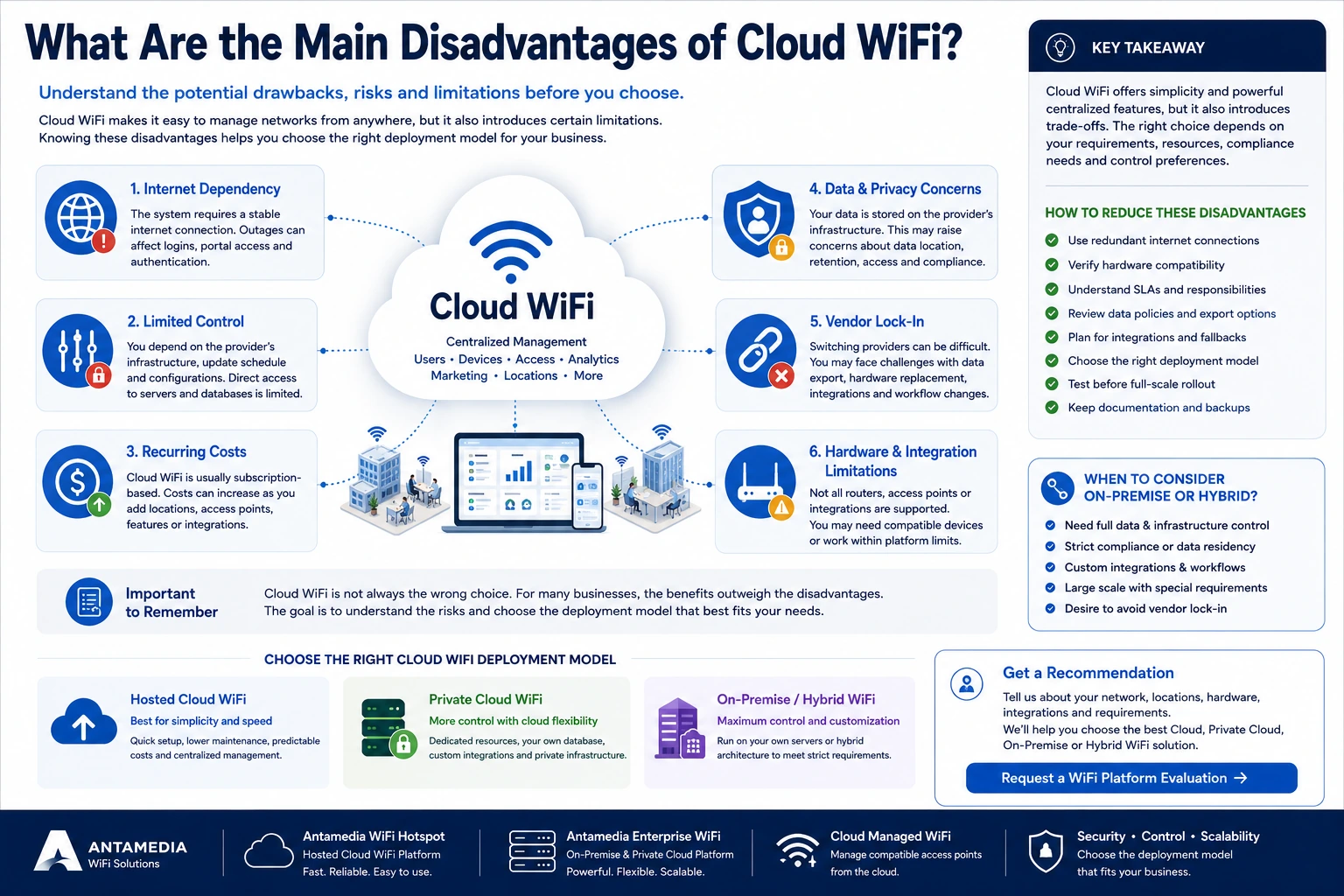
The main disadvantages of Cloud WiFi are dependence on internet connectivity, less control over the underlying infrastructure, recurring subscription costs, potential vendor lock-in, data-location concerns and limitations imposed by supported hardware or integrations. Most of these risks can be reduced through redundant internet connections, clear service agreements, export rights, verified hardware compatibility and, where necessary, an On-Premise or Hybrid deployment.
Cloud WiFi can make business networks easier to manage by centralizing captive portals, authentication, access policies, users, devices, analytics and access-point management.
However, cloud management does not eliminate every technical or operational risk.
Moving the central WiFi platform to the cloud changes where those risks exist and which organization is responsible for them.
Instead of maintaining the complete application and database locally, the business depends on:
Its internet connection
The Cloud WiFi provider
The provider’s hosting infrastructure
Correct communication between the local gateway and the cloud
Supported routers, access points and controllers
The provider’s pricing and product roadmap
Data export and migration options
The applicable service agreement
These disadvantages do not mean that Cloud WiFi is a poor choice.
For many small and medium-sized businesses, the operational simplicity of a hosted system outweighs the limitations. For organizations that require direct database access, private infrastructure, extensive customization or local control, an On-Premise or Hybrid platform may be more appropriate.
The correct decision depends on which disadvantages are relevant to the specific network.
Is Cloud WiFi the Same as the WiFi Connection?
No.
This distinction is important when discussing Cloud WiFi disadvantages.
A business WiFi service usually consists of several separate layers:
The local internet connection
The router or gateway
Switches, VLANs and firewall rules
Access points and wireless coverage
Captive portal and RADIUS authentication
The cloud management platform
External services such as DNS, PMS, payment, SMS or identity providers
A user may report that “Cloud WiFi is down” when the actual problem is:
The local ISP connection
A failed access point
A disconnected network cable
A router configuration error
A blocked firewall port
Incorrect DNS
Poor wireless signal
An overloaded access point
A third-party integration
Cloud hosting affects the central platform, but it does not replace or repair the local network.
This means that one of the main limitations of Cloud WiFi is that the end-to-end service still depends on components outside the cloud provider’s control.
1. Cloud WiFi Depends on Internet Connectivity
The most important limitation is dependence on communication between the local network and the cloud platform.
A Cloud WiFi gateway may need internet access to:
Load the captive portal
Contact the RADIUS server
Validate user credentials
Check a voucher
Verify a payment
Authenticate a hotel guest
Retrieve access policies
Record accounting data
Update device status
Synchronize reports
When the local ISP connection fails, users may still see the WiFi network name because the access points remain powered.
However, they may not be able to:
Open the captive portal
Complete a new login
Reach the internet
Validate a room number
Process a payment
Receive an OTP
Communicate with cloud integrations
This is usually a local connectivity problem, not cloud-platform downtime.
Can already connected users remain online?
The answer depends on:
Router or controller behavior
Authentication method
Session configuration
Local session cache
Accounting requirements
Type of ISP failure
Failover configuration
Some gateways may retain an already authorized session temporarily. Others may require continued communication with the cloud authentication service.
A business should not assume that all users will remain connected during an internet outage without testing the exact configuration.
How to reduce this disadvantage
Businesses where WiFi is operationally important should consider:
Two independent internet connections
Automatic WAN failover
4G or 5G backup
Backup power for networking equipment
Monitoring of both primary and secondary connections
Periodic failover testing
Documented router and RADIUS configuration
The backup connection should ideally use a different provider and physical access method.
Two internet services that depend on the same upstream cable or local exchange may fail at the same time.
2. A Cloud Platform Cannot Fix Poor Local WiFi
Moving management to the cloud does not improve radio coverage automatically.
Cloud WiFi may provide tools for configuring or monitoring supported access points, but the physical wireless network still requires correct design.
User experience can remain poor because of:
Insufficient access-point density
Incorrect access-point placement
Thick walls or structural interference
Overlapping channels
Radio-frequency interference
Excessive transmit power
Inadequate roaming configuration
Too many users on one access point
Insufficient ISP bandwidth
Old or unsupported hardware
Incorrect VLAN configuration
Faulty cabling
A cloud dashboard can report status and provide configuration options, but it cannot compensate for a badly designed wireless network.
Example
A hotel may have a fully operational cloud platform and a functioning captive portal.
Guests in rooms at the end of a corridor may still experience slow or unstable WiFi because the signal is weak.
That is a wireless coverage problem rather than a cloud problem.
How to reduce this disadvantage
Before deployment:
Perform a wireless site survey.
Estimate peak concurrent users.
Verify access-point capacity.
Plan channels and transmit power.
Separate guest and operational traffic.
Test roaming.
Confirm coverage in all required areas.
Apply per-user bandwidth controls where appropriate.
Cloud management should be treated as part of the network architecture, not as a replacement for network engineering.
3. Businesses Have Less Control Over the Underlying Infrastructure
With Hosted Cloud WiFi, the provider normally controls:
Application servers
Database infrastructure
Operating system
Software version
Update schedule
Backup process
Hosting region
Resource allocation
Monitoring tools
Platform maintenance windows
This reduces work for the customer, but it also reduces direct control.
The business may not be able to:
Access the underlying server
Query the production database directly
Install custom server software
Select every update window
Modify internal services
Change low-level security settings
Create unrestricted database integrations
Control the complete backup architecture
For a restaurant, café or small hotel, this limitation may be acceptable because maintaining servers would create more cost than value.
For an ISP, government organization, hospital group or large enterprise, direct infrastructure control may be a mandatory requirement.
How to reduce this disadvantage
Before selecting a hosted provider, confirm:
Where data is hosted
Which backup procedures are used
Which services are monitored
How updates are handled
Whether a dedicated environment is available
Which export options are provided
Whether APIs meet integration requirements
Whether migration to a private deployment is possible
Where Hosted Cloud does not provide sufficient control, consider:
Private Cloud
Customer-hosted virtual machine
On-Premise Enterprise WiFi
Hybrid architecture
Antamedia provides WiFi Hotspot as a hosted service and Enterprise WiFi System as a self-hosted platform for organizations requiring their own server or private cloud VM, domain, infrastructure and database control.
4. Cloud WiFi Usually Has Recurring Subscription Costs
Hosted Cloud WiFi is commonly licensed through a monthly or annual subscription.
The subscription may be based on:
Access points
Locations
Active users
Registered users
Concurrent users
Feature package
Data retention
Support level
API usage
Communication volume
Subscription pricing can be easier to budget than purchasing and maintaining a server environment.
However, the total cost may increase as the network grows.
Additional charges may apply for:
More access points
Additional locations
Advanced analytics
Premium support
White-label branding
PMS integration
API access
Data storage
SMS delivery
WhatsApp delivery
Email delivery
Additional administrator accounts
Custom development
When recurring cost becomes a disadvantage
Recurring fees may become less attractive when:
The deployment contains hundreds or thousands of access points.
The organization already owns suitable infrastructure.
Internal IT staff are already available.
The platform requires extensive customization.
Many optional services are charged separately.
Long-term subscription costs exceed private deployment costs.
Hosted Cloud versus On-Premise cost
On-Premise deployment may avoid some per-device cloud fees, but it introduces other expenses:
Server hardware or cloud VMs
Windows Server
Microsoft SQL Server
Storage
Backup systems
Monitoring
Security
Certificates
Database administration
Technical staff
Disaster recovery
Software maintenance
The correct comparison is not:
Cloud subscription versus no subscription
It is:
Complete hosted-cloud cost versus complete self-hosted cost
A self-hosted platform is not free to operate simply because the server belongs to the customer.
5. Vendor Lock-In Can Make Future Migration Difficult
Vendor lock-in occurs when a business becomes dependent on one provider because changing platforms would require:
Replacing network hardware
Recreating user accounts
Losing device records
Rebuilding splash pages
Reconfiguring every location
Rewriting integrations
Losing historical analytics
Changing administrator workflows
Exporting data from a proprietary format
The risk is greater when the provider controls both the software and mandatory proprietary hardware.
Questions to ask before committing
Confirm whether the provider allows export of:
User accounts
MAC addresses
Device records
Contact information
Consent data
Access plans
Account balances
Session records
Reports
Campaign history
Location information
Administrator records
Also ask:
Which formats are available?
Are raw records available?
Can passwords be transferred?
Is API access available?
Is there an export charge?
How long is data retained after cancellation?
Can compatible hardware continue to be used with another platform?
Is migration assistance available?
How Antamedia reduces migration risk
Antamedia WiFi Hotspot provides standard import options for user accounts and MAC addresses.
For more complex On-Premise and Hybrid projects, Antamedia developers can review an external database, map the required records and adapt the information for Microsoft SQL Server.
Not every provider-specific record will necessarily have an identical equivalent, but a migration does not always require rebuilding the complete system from the beginning.
6. Data Location and Privacy May Be Restricted
Cloud WiFi platforms may process information such as:
Names
Email addresses
Telephone numbers
MAC addresses
Device data
Login history
Location activity
Survey responses
Consent records
Payment references
Administrator activity
Some organizations have strict rules concerning:
The country where data is stored
Cross-border transfers
Database access
Data retention
Backup location
Third-party subprocessors
Government or industry requirements
Deletion procedures
Internal security policies
A standard shared cloud platform may not allow the customer to choose every aspect of the data-storage architecture.
When this becomes a significant disadvantage
This is particularly relevant to:
Government
Healthcare
Financial services
Education
Telecommunications
Large international organizations
Businesses operating in regulated markets
Organizations with customer-mandated data residency
How to reduce this disadvantage
Before purchasing, request clear answers concerning:
Data ownership
Hosting region
Subprocessors
Backup location
Retention period
Data export
Data deletion
Administrator access
Security incident procedures
Data processing agreement
When shared hosting cannot meet the requirement, use:
A customer-controlled private cloud
An approved regional hosting provider
On-Premise infrastructure
Hybrid architecture
7. Security Responsibility Is Shared
A common misconception is that the cloud provider becomes responsible for the security of the entire WiFi network.
The provider may protect the central application and infrastructure, but the business remains responsible for local elements such as:
Guest network isolation
VLAN configuration
Firewall rules
Router administrator passwords
Access-point firmware
Switch configuration
Internal network separation
Physical access
DNS policies
Local certificates
Staff administrator accounts
Backup power
A secure cloud platform cannot protect a business network when guests are connected directly to the same unsegmented network as:
Office computers
POS terminals
Servers
Security cameras
Printers
Medical devices
Building-management equipment
Cloud security risks may also include
Stolen administrator credentials
Incorrect administrator permissions
Weak passwords
Missing multi-factor authentication
Misconfigured API access
Excessive data retention
Incorrect privacy settings
Insecure third-party integrations
Unpatched local gateways
How to reduce this disadvantage
Use:
Separate guest VLANs
Client isolation
Strong administrator authentication
Role-based access
Multi-factor authentication where available
Firewall restrictions
Supported firmware
Regular access reviews
Audit logs
Documented retention policies
Staff security training
Cloud management can simplify security administration, but it does not remove the need for secure network design.
8. Hardware Compatibility May Be Limited
A cloud platform may not work with every:
Router
Access point
Wireless controller
Firmware version
Captive portal method
RADIUS implementation
Network topology
A provider may state that it supports a hardware brand while supporting only selected models or controller versions.
For example, support for one TP-Link, Aruba, Cisco or MikroTik integration does not automatically guarantee compatibility with every device from that manufacturer.
Potential consequences
The business may need to:
Replace existing hardware
Downgrade or upgrade firmware
Add a dedicated gateway
Change the controller
Modify VLAN design
Open additional firewall ports
Use fewer platform features
Maintain separate management systems
How to reduce this disadvantage
Before signing a contract, provide the provider with:
Exact router model
Exact access-point model
Controller name and version
Firmware version
Network topology
VLAN design
Authentication method
Expected number of users
Required functions
Ask for written confirmation of compatibility or complete a pilot deployment.
Antamedia works with supported RADIUS-capable routers, access points and controllers, but exact support depends on the selected platform, hardware model, network configuration and integration method.
9. Not Every Access Point Can Be Fully Cloud-Managed
There is a difference between:
Using an access point with a cloud captive portal
Authenticating through cloud RADIUS
Fully managing the access point from the cloud
A third-party access point may support external captive portal and RADIUS authentication while still requiring its own vendor controller for:
SSID configuration
Firmware updates
Radio channels
Transmit power
Roaming
Access-point monitoring
Device restart
This can result in two separate management platforms:
The Cloud WiFi platform for users, portals and authentication
The hardware-vendor controller for access points
Why this matters
A business expecting one dashboard for everything may discover that only some functions are centralized.
Cloud access-point management depends on:
Hardware support
Firmware support
Vendor APIs
Controller integration
Deployment method
Installed operating system
Antamedia Cloud Managed WiFi can manage supported HotspotOS access points, including selected SSID, status, performance, roaming, client-isolation and remote-action functions. Support still depends on the access-point model and deployment method.
10. Customization Can Be More Limited Than On-Premise
Shared cloud platforms must remain stable for many customers.
Providers may therefore restrict:
Custom server code
Direct database modifications
Proprietary authentication logic
Custom background services
Unrestricted reporting queries
Private network access
Custom ports
Unsupported integrations
Changes to core workflows
Update postponement
Configuration-level customization may still be extensive.
A hosted platform can commonly support:
Custom logos and colors
Branded splash pages
Multiple login methods
Custom forms
Surveys
Redirect URLs
Internet plans
Marketing campaigns
Administrator roles
Location-specific settings
However, configuration is not the same as unrestricted software modification.
When this becomes a disadvantage
Hosted Cloud may not be sufficient when the organization requires:
Direct database integration
Proprietary billing
Private APIs
Specialized authentication
Custom compliance workflows
Internal identity systems
Regional data synchronization
Custom customer hierarchy
Complete service-provider branding
Private Cloud, On-Premise or Hybrid deployment may provide a more suitable foundation for these requirements.
11. Third-Party Integrations Create Additional Dependencies
A Cloud WiFi login process may depend on systems outside the WiFi platform.
Examples include:
Hotel PMS
Payment gateway
SMS provider
WhatsApp provider
Email provider
Social-login service
Mobile-money gateway
Identity provider
DNS provider
External API
Even when the Cloud WiFi platform is operational, authentication or communication can fail if a third-party service is unavailable or changes its API.
Example
A hotel guest may be unable to authenticate with a room number because the PMS integration is unavailable.
The captive portal and RADIUS server may still be fully operational.
Other integration risks
API version changes
Expired credentials
Changed endpoints
Delivery-provider outages
Message-template rejection
Rate limits
Payment-provider failures
Certificate expiration
Incomplete error reporting
Responsibility divided between vendors
How to reduce this disadvantage
For each integration, define:
Supported version
Technical owner
Authentication method
Monitoring procedure
Error handling
Support escalation
Test environment
Update responsibility
Fallback login method
Where possible, provide an alternative access method when a third-party service is unavailable.
For example, a hotel may use PMS authentication as the primary method while retaining reception-created vouchers as a controlled fallback.
12. Troubleshooting Can Involve Several Providers
A traditional local WiFi problem may involve one internal IT team.
A cloud-managed WiFi problem can involve:
Cloud WiFi provider
Local ISP
Router vendor
Access-point vendor
Controller provider
Network integrator
PMS provider
Payment provider
SMS or WhatsApp provider
Customer IT team
This can make fault isolation more complicated.
Typical support problem
The customer reports:
“The splash page does not load.”
Possible causes include:
No internet connection
Incorrect DNS
Portal URL blocked
Missing walled-garden entry
Invalid certificate
Incorrect firewall rule
Captive portal detection issue
Router configuration
Provider service issue
Without clear ownership, each vendor may initially attribute the problem to another component.
How to reduce this disadvantage
Maintain:
Network diagram
Router configuration backup
Controller details
Portal URLs
RADIUS address and ports
Firewall rules
DNS settings
Integration credentials
Support contacts
Escalation procedure
Test accounts
Select a provider that clearly distinguishes between:
Platform support
Router configuration support
Access-point support
ISP problems
Integration support
Custom development
13. Service-Level Agreements May Cover Only Part of the Service
An advertised uptime percentage may not represent the availability experienced by WiFi users.
A service-level agreement may cover only:
Application infrastructure
Virtual machine availability
Administration portal
Captive portal
RADIUS service
Specific paid service tier
It may exclude:
Local ISP outages
Power failures
Routers
Access points
Customer configuration
Planned maintenance
External integrations
DNS providers
Force majeure
Unsupported hardware
Microsoft recommends treating provider SLAs as inputs to system design rather than assuming that one infrastructure SLA represents the reliability of the complete workload. The business must also account for its own dependencies, architecture and operational processes.
Questions to ask
Which services are covered?
How is downtime measured?
What monitoring interval is used?
Is RADIUS included?
Is the captive portal included?
Are APIs included?
Is planned maintenance excluded?
How are incidents reported?
Are restoration objectives defined?
Are service credits available?
Does the SLA apply to every subscription package?
A cloud provider’s infrastructure SLA does not guarantee that every user at every location will always be able to connect.
14. No Cloud Architecture Is Completely Immune to Outages
Cloud platforms can be designed for high availability, but no architecture eliminates every possible failure.
Availability depends on:
Number of application instances
Database design
Availability zones
Geographic regions
Network routing
Storage redundancy
Backups
Failover
Monitoring
Recovery procedures
Microsoft Azure Availability Zones are physically separated datacenter groups with independent power, cooling and networking. However, some services use multiple zones automatically while others require the application owner to configure zone redundancy. Availability Zones also do not by themselves protect against a complete regional outage.
Antamedia WiFi Hotspot has operated on Microsoft Azure without recorded platform downtime since 2014.
This is a strong historical reliability result, but it should not be interpreted as a claim that no future cloud, network or third-party incident is technically possible.
A responsible reliability strategy still includes:
Monitoring
Backups
Redundant components
Incident procedures
Local ISP failover
Tested recovery plans
15. Cloud WiFi May Provide Limited Offline Functionality
Some businesses expect WiFi authentication to continue locally when the cloud cannot be reached.
This behavior is not standard across all routers and platforms.
Offline functionality may be limited because the cloud system contains:
User database
Voucher status
Payment status
Session rules
Access plans
Device limits
PMS validation
Customer permissions
Accounting records
A local gateway may not have enough current information to authorize a new user safely.
Possible offline approaches
Depending on the architecture, a system may use:
Cached sessions
Locally stored users
Temporary emergency access
A backup captive portal
Secondary RADIUS
Local authentication
Hybrid components
Pre-created vouchers
However, these functions must be intentionally designed and tested.
The term Hybrid deployment does not automatically mean that full authentication continues without internet access.
16. Captive Portals Can Add Friction to the Guest Experience
A Cloud WiFi platform commonly uses a captive portal to:
Collect user information
Display terms
Authenticate guests
Show promotions
Process payment
Apply an Internet plan
This adds more steps than using a shared password.
Guests may experience problems when:
Captive portal detection does not open automatically
The device uses a VPN
Private DNS interferes with redirection
The browser blocks the window
The guest enters incorrect information
OTP delivery is delayed
Social login is unavailable
The terms are too long
The form asks for too much information
The splash page is not mobile-friendly
How to reduce this disadvantage
Keep the login flow:
Mobile responsive
Fast
Clear
Short
Appropriate to the venue
Available in relevant languages
Tested on Android and iOS
Limited to necessary fields
Equipped with a practical fallback method
A restaurant may require only a simple click-through or email field.
A hotel may need room-number and surname validation.
The authentication method should match the business requirement rather than collecting unnecessary information from every visitor.
17. Customer Identification Is Not Always Exact
Cloud WiFi platforms can identify users through:
User accounts
Email addresses
Phone numbers
Vouchers
PMS details
Device identifiers
MAC addresses
Cookies
Campaign interactions
However, modern mobile devices may use private or randomized MAC addresses.
This can affect:
Device recognition
Returning-visitor statistics
Device limits
Automatic login
Customer matching
A returning user may appear as a new device when the device presents a different MAC address.
Conversely, an account shared between people may make several users appear to be one customer.
How to reduce this limitation
Use several identity signals where appropriate:
Account login
Verified email
Verified mobile number
Consent-based customer profile
Device registration
Location history
Campaign-specific links
Booking or coupon data
WiFi analytics should be interpreted as useful operational and marketing information, not as an infallible physical identity system.
18. Marketing Data Creates Additional Responsibilities
One of the main Cloud WiFi benefits is the ability to collect consent-based customer information and send:
Email campaigns
SMS campaigns
WhatsApp campaigns
Surveys
Return-visit offers
Inactivity campaigns
However, collecting this information creates responsibilities concerning:
Consent
Purpose limitation
Data accuracy
Retention
Unsubscribe requests
Access requests
Deletion
Communication frequency
Legal basis
Provider rules
A business should not collect contact data simply because the platform allows it.
It should define:
Why each field is required
Which messages will be sent
Which communication channels are used
How consent is recorded
How consent is withdrawn
How long information is stored
Who can access the information
Cloud WiFi marketing can produce substantial value, but it must be configured and operated responsibly.
19. Platform Changes Are Controlled by the Provider
Hosted software changes over time.
The provider may:
Add features
Remove outdated functions
Change the user interface
Update APIs
Change package limits
Modify prices
End support for old hardware
Change integration requirements
Schedule maintenance
These changes may affect internal procedures, staff training or custom integrations.
Questions to ask
Are release notes available?
Are important changes announced?
Is API backward compatibility documented?
Can customers test major changes?
How long are old versions supported?
Can On-Premise customers control upgrade timing?
What happens when hardware support ends?
Are custom developments maintained?
Hosted Cloud offers easier updates, but customers normally have less control over when the common platform changes.
Enterprise or On-Premise deployment may allow a more controlled update schedule, although delaying updates can also create security and compatibility risks.
20. A Standard Cloud Package May Not Scale Economically Forever
Cloud WiFi can be highly scalable from a technical perspective, but the standard commercial package may not remain the best option at every size.
As the deployment grows, the business may require:
Dedicated application resources
Dedicated database
More RADIUS capacity
Regional infrastructure
Customer hierarchy
Custom domains
Advanced API access
Longer data retention
More support
Private integrations
White-label service
Custom billing
At that point, a standard hosted package may become:
Too expensive
Too restrictive
Operationally insufficient
Difficult to customize
A larger deployment may benefit from:
Private Cloud Enterprise WiFi
On-Premise Enterprise WiFi
Hybrid architecture
Dedicated commercial agreement
Antamedia positions WiFi Hotspot as the hosted option for faster setup and easier maintenance, while Enterprise WiFi is intended for organizations requiring private infrastructure, full domain control, customer hierarchy, reseller functionality or larger deployments.
Are the Disadvantages of Cloud WiFi the Same for Every Business?
No.
The importance of each limitation depends on the business.
Small Restaurant or Café
Most relevant concerns:
Monthly subscription
Captive portal simplicity
Reliable local internet
Guest privacy
Message-delivery costs
Easy support
Less likely to require:
Direct database access
Private cloud
Regional server architecture
Custom RADIUS development
For this business, Hosted Cloud is often the simplest and most economical option.
Independent Hotel
Most relevant concerns:
Reliable PMS integration
Local ISP redundancy
Guest authentication
Support availability
Data privacy
Access-point coverage
Fallback vouchers
The hotel should test the complete guest journey before launch.
Hotel Group or Retail Chain
Most relevant concerns:
Multi-location administration
Regional roles
Reporting
Data governance
Integration scalability
Contract terms
Pricing as locations increase
Migration options
A hosted platform may remain suitable, but Private Cloud or Hybrid should be evaluated as the network expands.
Healthcare or Government Organization
Most relevant concerns:
Data location
Private infrastructure
Security policy
Internal identity systems
Audit requirements
Direct database control
Disaster recovery
On-Premise or Hybrid deployment may be more appropriate.
ISP, MSP or Reseller
Most relevant concerns:
Vendor lock-in
Customer hierarchy
White-label branding
Domain control
Infrastructure capacity
API access
Database access
Per-access-point pricing
Customer migration
Enterprise WiFi on Private Cloud or On-Premise infrastructure is generally more suitable than a standard shared platform.
Cloud WiFi Disadvantages and Practical Mitigations
Internet dependency
Risk: New users may be unable to authenticate when the local internet connection fails.
Mitigation: Dual ISP, automatic failover, cellular backup and tested routing.
Limited infrastructure control
Risk: The customer cannot directly manage servers or the database.
Mitigation: Private Cloud, On-Premise or a dedicated deployment.
Recurring costs
Risk: Subscription costs increase with locations, access points or features.
Mitigation: Calculate total cost of ownership and review Enterprise licensing at scale.
Vendor lock-in
Risk: Data, hardware or integrations are difficult to move.
Mitigation: Confirm export formats, API access, hardware independence and migration rights before purchase.
Data-location limitations
Risk: Shared hosting may not satisfy internal or regulatory requirements.
Mitigation: Select approved hosting regions, Private Cloud, On-Premise or Hybrid.
Hardware compatibility
Risk: Existing devices may not support the required captive portal or management functions.
Mitigation: Verify exact models and firmware and complete a pilot.
Integration dependency
Risk: PMS, payment, SMS or identity-provider problems affect the WiFi workflow.
Mitigation: Define integration ownership, monitoring, fallback methods and support escalation.
Captive portal friction
Risk: Guests abandon or fail the login process.
Mitigation: Use a short, mobile-friendly flow and test on real devices.
Complex troubleshooting
Risk: Several vendors may be involved in one incident.
Mitigation: Maintain documentation and define clear support responsibilities.
Limited customization
Risk: Shared hosting cannot support proprietary workflows.
Mitigation: Use Enterprise WiFi, Private Cloud, On-Premise or Hybrid architecture.
When Is Cloud WiFi Still the Better Choice?
Cloud WiFi is usually the better choice when:
The business wants fast implementation.
Internal server administration should be avoided.
One or multiple locations require central management.
Standard integrations are sufficient.
Cloud data storage is acceptable.
Subscription costs are predictable.
Remote administration is important.
Marketing and analytics are required.
The organization has limited internal IT resources.
The disadvantages are often manageable when the provider, local network and commercial agreement are selected carefully.
When Should You Consider On-Premise or Hybrid WiFi?
Consider an alternative deployment when:
Data must remain in customer-controlled infrastructure.
Direct database access is required.
Internal systems cannot communicate with a shared cloud service.
Full platform branding is required.
The organization operates as an ISP, MSP or reseller.
The deployment is very large.
Custom authentication or billing is required.
The customer needs to control update timing.
Regional infrastructure is required.
Cloud subscription costs become inefficient at scale.
Local and cloud components must operate together.
The decision should not be based on the assumption that one deployment model is universally superior.
The appropriate model is the one that provides the necessary control without introducing more cost and operational complexity than the organization can manage.
Cloud WiFi Risk-Assessment Checklist
Connectivity
Primary internet connection is reliable.
Backup internet is available where required.
Automatic failover has been tested.
RADIUS and portal traffic use the backup connection.
Network equipment has backup power.
Local network
Wireless coverage has been verified.
Peak capacity has been estimated.
Guest traffic is separated.
Client isolation is enabled where appropriate.
Router and access-point firmware is supported.
Network configuration is documented.
Platform reliability
Hosting architecture is understood.
Monitored services are defined.
SLA coverage is clear.
Incident notification is documented.
Backup and recovery processes are understood.
Planned maintenance is explained.
Data and security
Data ownership is documented.
Hosting location is acceptable.
Retention periods are defined.
Export and deletion are supported.
Administrator roles are reviewed.
Authentication and audit requirements are satisfied.
Hardware and integration
Exact hardware models are verified.
Controller and firmware versions are verified.
Required integrations are tested.
Integration ownership is defined.
Fallback login methods are available.
API requirements are documented.
Commercial and migration
Complete subscription cost is calculated.
Expansion pricing is known.
Optional feature costs are known.
Data export is available.
Migration process is documented.
Cancellation terms are understood.
Vendor lock-in risk is acceptable.
How Antamedia Addresses Cloud WiFi Limitations
Antamedia provides several deployment options so businesses do not have to use the same operating model for every project.
Hosted WiFi Hotspot
WiFi Hotspot is hosted and managed by Antamedia and is intended for businesses that want:
Faster deployment
Lower infrastructure maintenance
Cloud-based captive portals
User and voucher management
Payments
Access limits
Analytics
WiFi marketing
Multiple locations
The Antamedia cloud platform has operated on Microsoft Azure without recorded platform downtime since 2014.
Enterprise WiFi System
Enterprise WiFi System can run on:
Customer server
Private cloud VM
Preferred data center
Dedicated infrastructure
It is appropriate when the organization needs:
Direct database control
Own domain
Full branding
Customer hierarchy
Reseller workflows
Private infrastructure
Advanced integrations
Larger deployments
Hybrid deployment
Hybrid architecture can be evaluated when cloud services must work with:
Customer-controlled Microsoft SQL Server
Private PMS
Internal identity systems
Regional infrastructure
Existing legacy platforms
Private APIs
Both WiFi Hotspot and Enterprise WiFi share core guest-access capabilities, while their primary differences concern hosting, infrastructure responsibility, control and deployment scale.
Frequently Asked Questions
What are the main disadvantages of Cloud WiFi?
The main disadvantages are internet dependency, less infrastructure control, recurring subscription costs, vendor lock-in risk, data-location concerns, hardware compatibility limits and dependence on third-party integrations.
Does Cloud WiFi stop working when the internet goes down?
The WiFi network name may remain visible, but users will not have internet access. New cloud-based authentication may also fail. Existing session behavior depends on the router, controller and authentication configuration.
Can Cloud WiFi work offline?
Some limited functions may continue through cached sessions or local gateway behavior, but full offline authentication is not standard. Offline requirements must be specifically designed and tested.
Is Cloud WiFi less secure than On-Premise WiFi?
Not automatically. Security depends on the complete architecture, configuration, administrator access, local network separation, monitoring and maintenance. On-Premise provides more control but also requires the customer to secure and maintain the infrastructure.
Is Cloud WiFi more expensive than On-Premise?
Hosted Cloud usually requires less initial infrastructure but has recurring subscription costs. On-Premise may be economical at larger scale, but server, database, backup, monitoring and staff costs must be included.
What is the biggest Cloud WiFi risk?
For many locations, the most immediate practical risk is dependence on the local internet connection. For larger organizations, data control, integration requirements and vendor lock-in may be equally important.
Can I use Cloud WiFi with my existing access points?
Possibly. Compatibility depends on the exact access-point, router, controller, firmware and required features. The equipment should be verified before deployment.
Does Cloud WiFi require proprietary hardware?
Not always. Some platforms require their own hardware, while multi-vendor platforms can work with supported RADIUS-capable routers, access points and controllers.
Can a Cloud WiFi provider access my customer data?
The provider may process data as required to operate the service. Data ownership, access, permitted processing, subprocessors, retention and deletion should be defined in the contract and privacy documentation.
Can I export my data if I leave the provider?
This depends on the provider. Confirm export options for user accounts, devices, contact data, consent, plans, balances, sessions and reports before signing the contract.
What is Cloud WiFi vendor lock-in?
Vendor lock-in occurs when changing providers requires replacing hardware, losing data, rebuilding integrations or recreating platform configuration.
Can Cloud WiFi identify every returning customer?
Not perfectly. Identification can be affected by shared accounts, deleted cookies and private or randomized MAC addresses. Account-based and consent-based customer profiles can improve accuracy.
Does a cloud SLA cover my local WiFi network?
Normally not. A cloud SLA usually excludes the customer’s ISP, power, router, access points, cabling, configuration and third-party services.
Is Cloud WiFi suitable for regulated organizations?
It can be, but data location, security, retention, audit, contract and infrastructure requirements must be reviewed. Private Cloud, On-Premise or Hybrid may be required.
When should I choose On-Premise instead?
Choose On-Premise when direct infrastructure and database control, private integration, regional data storage or customer-controlled security procedures are mandatory.
Can I switch from Cloud WiFi to On-Premise later?
Migration may be possible, depending on the provider, data formats, password storage, integrations and historical records. The migration path should be reviewed before the initial deployment.
Understand the Limitations Before You Choose
Cloud WiFi can reduce server maintenance, accelerate deployment and centralize management across one or many locations.
Its disadvantages primarily come from internet dependence, reduced infrastructure control, recurring costs, provider reliance and the need to coordinate cloud services with local network equipment.
These limitations can often be managed through:
Reliable local network design
Backup internet
Verified hardware
Clear security responsibilities
Defined SLAs
Data export rights
Tested integrations
Appropriate deployment selection
The objective should not be to avoid every cloud-related limitation.
It should be to identify which risks are material to your business and select the Hosted Cloud, Private Cloud, On-Premise or Hybrid model that manages those risks most effectively.
CTA Heading: Evaluate Cloud WiFi Risks for Your Network
Provide your number of locations, hardware models, expected users, internet redundancy, integrations, data requirements and preferred hosting model. Antamedia can review your requirements and recommend an appropriate Hosted Cloud, Private Cloud, On-Premise or Hybrid architecture.