
In Brief
You can switch cloud or WiFi platform providers without losing important data, provided your current provider can export it in a usable format. Antamedia WiFi Hotspot supports self-service imports of user accounts and MAC addresses, while complex On-Premise and Hybrid migrations can be adapted by our developers and transferred to Microsoft SQL Server.
What You Can Migrate
User accounts
MAC addresses and registered devices
Account balances and remaining time
Data quotas and speed limits
Expiration dates and access plans
Selected customer and location data
Custom database records for On-Premise and Hybrid deployments
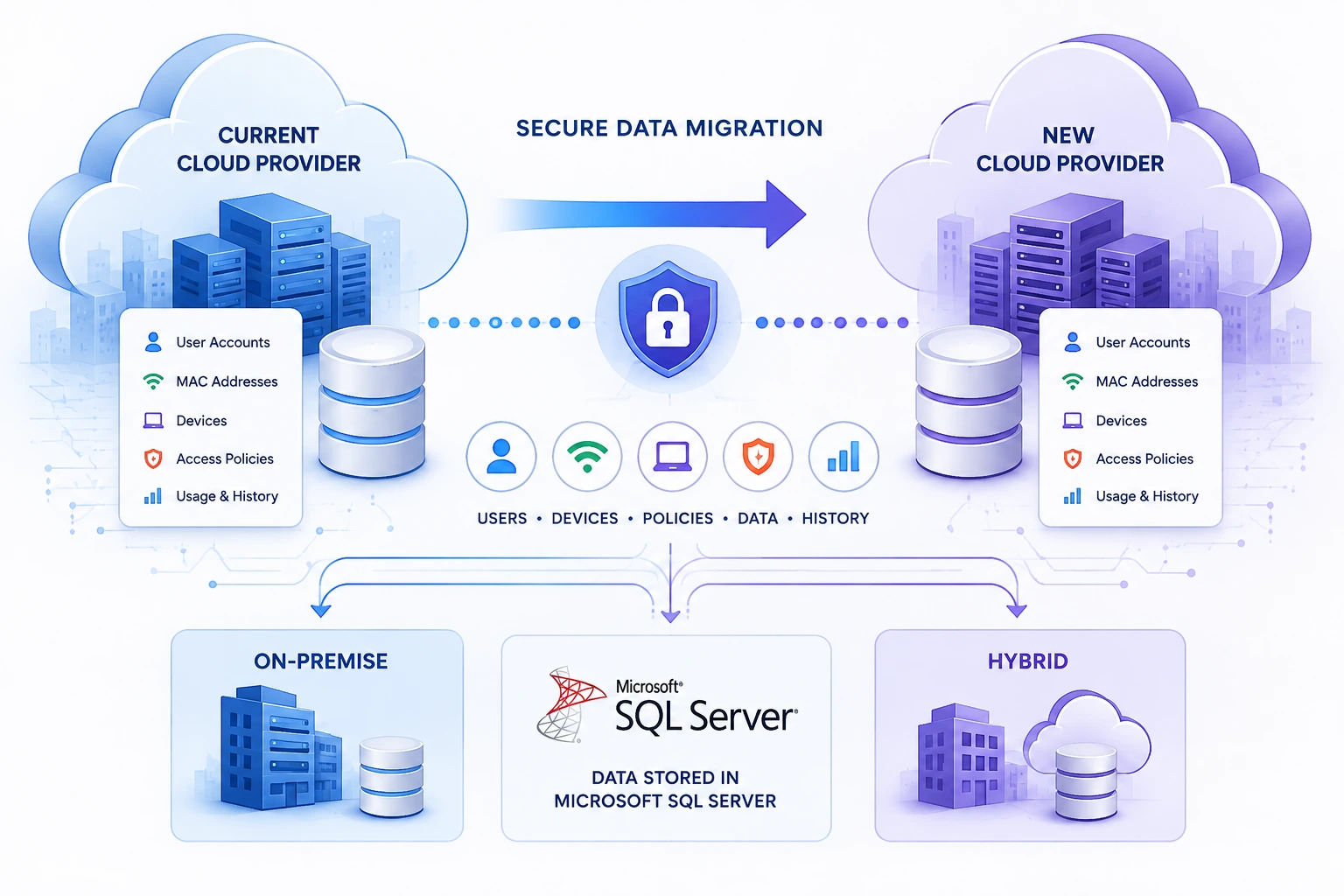
Can I Switch Cloud Providers Without Losing My Data?
Changing a cloud provider can create a reasonable concern: what happens to user accounts, registered devices, access rules, historical records, and integrations already connected to the existing platform?
In many cases, switching providers does not require starting from zero. When the existing provider allows data to be exported in a usable format, important records can be imported directly or converted for the new platform.
Antamedia WiFi Hotspot supports several migration options, ranging from self-service imports to custom database conversion for larger On-Premise and Hybrid deployments.
What Does Vendor Lock-In Mean for WiFi Platforms?
Vendor lock-in occurs when a business becomes dependent on one provider because its data, hardware, integrations, or operating procedures cannot easily be moved elsewhere.
This can become a serious issue for hotels, airports, hospitals, retail groups, internet service providers, and managed service providers operating multiple WiFi locations. As the deployment grows, the platform may accumulate thousands of user accounts, registered devices, access policies, payment records, and customer details.
Replacing the platform without a migration plan could require users to register again, devices to be added manually, and access policies to be recreated from the beginning.
A flexible WiFi platform should therefore provide practical ways to import existing data and support custom migration when the source system uses a different database structure.
Can Data Be Moved Without Losing It?
Yes, provided that the existing provider can export the required data and that the exported information can be mapped to the destination platform.
The migration method depends on:
The type of data being transferred
The format provided by the current platform
The database structure
Whether the new deployment is Cloud, On-Premise, or Hybrid
Whether historical data must be preserved
Whether custom integrations are involved
Simple data, such as user accounts or MAC addresses, can often be imported directly. More complex records may require field mapping, database conversion, validation, and a controlled migration performed by developers.
The objective is not only to copy records. The imported data must also function correctly within the access, authentication, billing, and reporting logic of the new platform.
Importing User Accounts Into Antamedia WiFi Hotspot
Antamedia WiFi Hotspot allows administrators to import user accounts from a properly formatted file.
This option is suitable when an organization already has an existing list of:
Usernames
Passwords
Remaining access time
Download and upload limits
Data quotas
Account balances
Other supported account values
The administrator prepares the source data in the required format and performs the import from the WiFi Hotspot administration panel. This means that many migrations can be handled directly by the customer without requiring manual account creation.
When some values are not included in the source file, imported accounts can be assigned to an existing price plan or access policy, depending on the selected configuration.
This is useful when moving users from another captive portal, hotspot billing platform, membership system, or internally maintained account database.
Importing Existing MAC Addresses
Existing MAC addresses can also be imported into the WiFi Hotspot section.
This is important for deployments that use device recognition, autologin, registered-device access, or MAC-based authorization. Importing the existing MAC address list can prevent known users or authorized devices from having to repeat the complete registration process after the migration.
MAC address import may be useful for:
Returning guest devices
Staff devices
Approved operational equipment
Long-term residents or members
Devices using automatic WiFi login
Equipment that should receive predefined access
Administrators should review the source data before importing it. Modern mobile devices may use private or randomized MAC addresses, so some stored device identifiers may no longer match the address currently presented by the device.
Custom Database Migration for On-Premise and Hybrid Deployments
Enterprise migrations are often more complex than importing a CSV file.
An existing system may use a different database engine, table structure, field naming convention, authentication method, or relationship between users, devices, plans, and locations.
For On-Premise and Hybrid Antamedia deployments, our developers can analyze the existing database, adapt its structure, and prepare the required data for import into Microsoft SQL Server.
A custom migration can include data mapping between the old platform and the Antamedia environment. The exact scope depends on the available source database and the records that the organization needs to preserve.
The migration process may include:
Analysis of the source database
Identification of relevant tables and fields
Mapping users and devices to the new structure
Conversion of values and formats
Removal of invalid or duplicated records
Test import into a separate environment
Validation of account and access behavior
Final database import before production launch
This approach is especially useful for large deployments where manually recreating thousands of users, devices, plans, or locations would be impractical.
Which Data Can Be Migrated?
The easiest records to migrate are structured data fields that have a clear equivalent in the destination system.
Depending on the source database and agreed migration scope, these may include:
User accounts
User contact details
MAC addresses
Device records
Account balances
Remaining access time
Data quotas
Speed limits
Account expiration values
Price plan assignments
Location relationships
Selected customer or membership information
Not every platform stores information in the same way. Some data may need to be transformed, combined, separated, or assigned to a new access policy.
For that reason, a sample database or export file should be reviewed before the final migration scope is confirmed.
Will Every Record Transfer Exactly as It Appeared Before?
Not necessarily.
User accounts and device identifiers are usually easier to migrate than platform-specific information such as active sessions, proprietary reports, dashboard calculations, encrypted password formats, audit logs, custom automations, or historical analytics.
A field in the old platform may not have a direct equivalent in the new one. In other cases, both systems may store similar information but calculate or display it differently.
For example, a previous platform may store bandwidth limits as a package-level value, while the new platform may apply them through a price plan. The data can still be preserved, but it may need to be mapped to the appropriate Antamedia policy rather than copied directly into an identical field.
The migration review identifies these differences before the production database is changed.
What About Passwords?
Password migration depends on how the existing provider stores and exports them.
When passwords are available in a compatible import format, they may be included with imported accounts. When the source platform exports only encrypted or proprietary password hashes that cannot be reused, users may need to receive new passwords or complete a password reset.
This limitation is normally determined by the source provider and its database design rather than by the account import process itself.
It is therefore important to inspect the available export before deciding whether users can continue with their existing credentials.
Can I Move From Cloud to On-Premise or Hybrid?
A change of hosting model can be treated as a planned infrastructure and database migration.
Organizations may move to an On-Premise or Hybrid deployment because they require:
Greater infrastructure control
Private database hosting
Specific data residency
Integration with internal systems
Local authentication services
Custom security policies
Direct database access
A dedicated enterprise environment
The application environment, database requirements, integrations, certificates, network access, and migration scope should be reviewed before the new deployment is placed into production.
For larger projects, the migration is tested before the final cutover so that account authentication, device access, policies, and integrations can be verified in the new environment.
How to Prepare for a Provider Migration
A successful migration begins with identifying which data is operationally important.
Before changing providers, request an export of the relevant database or records from the current platform. The export should be reviewed for completeness, consistency, encoding, date formats, duplicate entries, and missing values.
The migration plan should define:
Which records must be transferred
Which records can be archived instead
Which access policies must be recreated
Whether existing passwords can be preserved
Which integrations must be reconfigured
How the imported data will be tested
When the final production cutover will occur
A test migration is strongly recommended for large databases. It allows administrators to confirm that users can authenticate, known devices are recognized, access limits are correct, and reporting starts correctly before the old platform is retired.
How Antamedia Reduces Vendor Lock-In Risk
Antamedia provides different migration paths based on the size and complexity of the deployment.
For standard migrations, administrators can import user accounts and MAC addresses themselves through the WiFi Hotspot platform.
For more complex On-Premise and Hybrid projects, Antamedia developers can analyze an external database, convert the required data, and import it into the Microsoft SQL Server environment used by the new deployment.
This gives organizations more flexibility than a closed platform where every account and device must be recreated manually.
The final migration scope always depends on the quality and availability of the data exported by the existing provider. However, moving to a new platform does not automatically mean losing the operational data that the business has already collected.
Frequently Asked Questions
Can I import users from another captive portal?
Yes. User accounts can be imported when the existing platform provides the required information in a supported and properly structured format.
Can I preserve registered device MAC addresses?
Yes. Existing MAC address records can be imported into the WiFi Hotspot section. The list should be reviewed because some mobile devices use private or randomized MAC addresses.
Do I need Antamedia developers for every migration?
No. Administrators can perform standard user-account and MAC-address imports themselves. Developer assistance is normally required for complex databases, custom field mapping, or larger On-Premise and Hybrid projects.
Can Antamedia migrate an external database?
For On-Premise and Hybrid deployments, Antamedia developers can analyze the source database and prepare a custom conversion into Microsoft SQL Server. The required work is determined after reviewing the database structure and a sample of the available data.
Will my historical reports also be transferred?
Historical reporting data requires separate evaluation. Some raw records may be transferable, but provider-specific dashboards, calculated metrics, and proprietary report structures may not have direct equivalents.
Will there be service interruption?
A planned migration can reduce interruption by preparing and validating the new environment before the final cutover. The exact procedure depends on the deployment size, database volume, integrations, and network architecture.
Plan Your Migration Before Changing Providers
Changing a cloud or WiFi platform provider should be a controlled technical project, not a complete operational reset.
Antamedia WiFi Hotspot provides self-service imports for user accounts and MAC addresses, while On-Premise and Hybrid customers can use custom database migration services for more complex requirements.
Provide a sample export or database structure before the migration begins. This allows the required fields, conversion work, limitations, and final migration procedure to be defined before the production system is changed.
Planning to Replace Your Current WiFi Platform?
Send us a sample export, database structure, or list of the records you need to preserve. Our team can review the available data and recommend the appropriate self-service import or custom migration procedure.
Prefer Antamedia on Google
Get practical guest WiFi and network management insights directly from Antamedia.