
What Is a Captive Portal for Business WiFi?
In Brief: A captive portal is the login or authorization page guests complete before receiving internet access on a WiFi network. It can control authentication, terms acceptance, vouchers, payments, session limits, bandwidth policies, and data collection while creating a branded and manageable guest access experience.
A guest joins your WiFi network, opens a browser, and sees a branded page asking them to accept terms, enter an access code, pay for service, or sign in. That moment is where network control meets customer experience. What is a captive portal? It is the access gateway that directs users to that page before allowing them onto the internet.
For a hotel, restaurant, airport, retail location, hospital, or campus, a captive portal turns basic guest WiFi into a managed business service. It can separate visitors from internal systems, enforce usage policies, collect consent, support paid access, and create a useful customer touchpoint without placing unnecessary work on staff.
What Is a Captive Portal and How Does It Work?
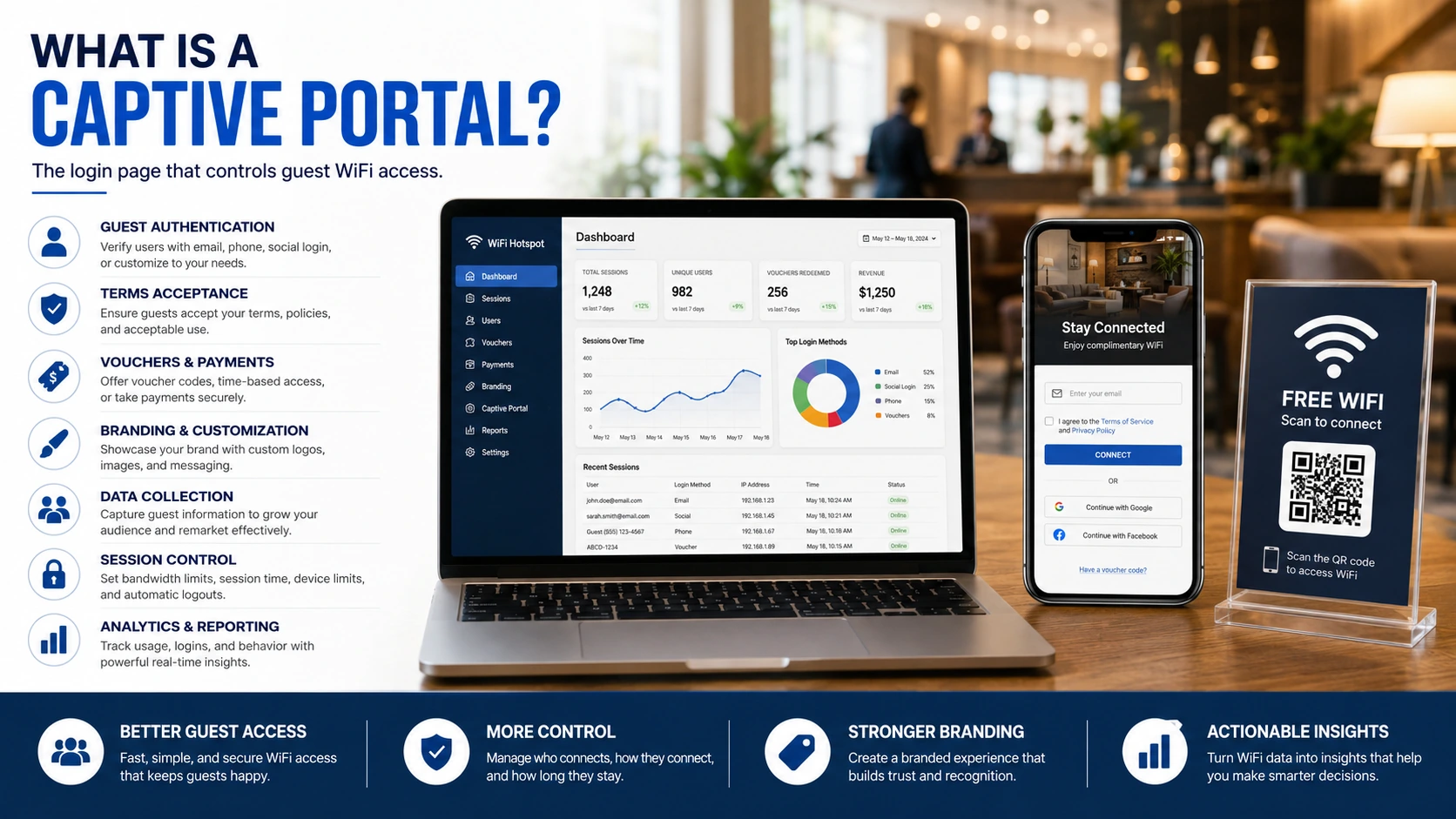
A captive portal is a web page or authentication process that a user must complete before receiving internet access on a WiFi network. The portal sits between the guest device and the public internet. Until the user meets the configured requirement, the network allows only limited traffic, such as access to the login page, payment processor, or a designated help page.
The process usually starts when a guest selects an SSID such as “Hotel Guest WiFi” or “Cafe Free WiFi.” The access point, router, or cloud WiFi platform identifies the device and redirects its first web request to the portal. The guest then completes the required action. Depending on the venue, that may mean accepting terms and conditions, entering a voucher code, authenticating through a property management system, signing in with an email address, completing a survey, watching an ad, or purchasing a connection plan.
Once approved, the portal communicates with the network control layer, often through RADIUS, a gateway, or a virtual controller. The system applies the access policy assigned to that user or device. Policies can define session duration, bandwidth limits, data allowances, allowed destinations, device limits, and access schedules. When the session expires, the user can be redirected back to the portal or disconnected automatically.
This is more than a login screen. A well-configured captive portal is part of the network’s policy enforcement system.
Why Businesses Use Captive Portals
Open WiFi with a shared password is easy to launch, but it gives operators limited visibility and few controls. Anyone with the password can connect, and the business has little ability to distinguish a guest from an unauthorized user, enforce a fair-use policy, or measure service performance.
A captive portal creates a structured access process. For IT teams, that means stronger guest-network segmentation, identifiable session records, configurable limits, and centralized policy management. For operators, it means a consistent guest experience across properties and fewer manual requests for WiFi credentials. For commercial teams, it creates an optional channel for consent-based data collection, promotions, surveys, advertising, and paid internet packages.
The business value depends on the environment. A quick-service restaurant may prioritize email capture and repeat-visit promotions. A hotel may need room-number authentication, premium bandwidth packages, and integration with guest systems. An airport or transit operator may require time-based access, multilingual pages, sponsor advertising, and high-volume device management. The portal should reflect the service model, not force every venue into the same login flow.
Common Captive Portal Authentication Methods
The right authentication method depends on the level of control required and the amount of friction a venue can reasonably ask guests to accept. A free café network may only need an acceptable-use acknowledgment. A hospital or university may require stronger identity verification and detailed session controls.
The most common approaches include the following:
Terms acceptance: Guests agree to acceptable-use terms before connecting. This is fast and suitable for low-friction public access.
Voucher or access code: Staff, event organizers, or automated systems issue codes with defined limits for time, data, or devices.
Email or SMS login: The portal verifies a contact method and can support permission-based marketing workflows.
Social login: Guests sign in through an approved social identity provider, where supported and appropriate for the venue’s privacy model.
Account, room, or membership login: The portal checks credentials against an existing business system, such as a hotel property management platform, loyalty program, student directory, or subscriber database.
Paid access: Guests select and purchase a WiFi plan through an integrated payment flow.
Each option involves a trade-off. Less friction can improve connection rates, while stronger authentication can improve accountability and support premium services. Asking for too much information for a short café visit may reduce adoption. Offering only a click-through page at a paid event may make it difficult to protect capacity for paying attendees.
The Network Controls Behind the Login Page
The visible portal page is only one part of the system. The operational value comes from what happens after authorization.
A captive portal can assign different policies to different user groups. Employees may receive access to internal business applications through a separate secured network, while guests receive internet-only access. VIP hotel guests may receive higher bandwidth than standard users. Event staff may have longer sessions than attendees. A network can also restrict peer-to-peer traffic, block inappropriate categories, limit the number of devices per account, and apply per-user speed limits to prevent a small number of devices from consuming available capacity.
Device tracking is another practical control. Portals generally recognize devices by identifiers such as MAC addresses, often combined with session and authentication data. This allows an operator to support return visits, enforce device limits, or recognize a valid voucher session. However, modern operating systems may use private or randomized MAC addresses, so operators should validate how their platform handles repeat-device recognition and avoid relying on a single identifier for sensitive identity decisions.
For larger deployments, centralized administration matters. A multi-location organization should be able to manage portal templates, access rules, user accounts, vouchers, reporting, and branding from one console while still allowing local exceptions. That consistency reduces configuration drift and makes it easier to audit guest WiFi policies across the organization.
Security, Privacy, and Compliance Considerations
A captive portal improves control, but it is not a substitute for network security. Guest traffic should be isolated from point-of-sale systems, employee devices, medical equipment, operational technology, and other sensitive resources. Network segmentation, firewall rules, client isolation, secure administrative access, and current firmware remain essential.
The portal itself should use HTTPS and a valid certificate. Guests are rightly cautious when a login page produces browser security warnings. Administrators should also configure a walled garden carefully so users can reach only the services needed to complete authentication, rather than exposing unnecessary destinations before authorization.
Privacy requires equal attention. If the portal collects names, email addresses, phone numbers, demographic details, or marketing consent, the business should collect only what it can justify and use. The page should clearly explain what is being collected, why it is collected, and how a guest can manage communications. Retention periods, consent records, and access to collected data should align with the organization’s legal obligations and privacy policy.
Logging can support security investigations, capacity planning, and service troubleshooting, but more data is not automatically better. Define what logs are necessary, who can access them, and how long they will be retained. This is especially relevant for healthcare, education, government, and enterprise environments with stricter governance requirements.
Turning Guest WiFi Into a Measurable Channel
A captive portal can be a revenue and engagement layer when it is designed with a clear business objective. A retailer might display a current offer after login. A venue can present a brief satisfaction survey at the end of a session. A hotel can offer a paid upgrade for faster service. An ISP or managed service provider can use branded portals, payment plans, vouchers, and subscriber authentication across customer locations.
The best campaigns are restrained. A slow, cluttered portal can undermine the very guest experience it is meant to support. Keep the page mobile-friendly, load it quickly, state the value of connecting, and ask only for information that has a defined use. Measure connection completion rate, repeat visits, session duration, voucher usage, paid-plan conversion, survey response, and campaign engagement. These metrics reveal whether the portal is helping the business or creating avoidable friction.
Platforms such as Start Hotspot combine access control with branded pages, marketing workflows, billing, analytics, and centralized administration, allowing organizations to manage the technical and commercial sides of guest WiFi from a single environment.
Choosing the Right Captive Portal Deployment
Cloud-managed captive portals are often the practical choice for distributed venues that need fast rollout, remote administration, and consistent branding. They reduce the need to manage a separate controller at every location and can simplify updates to portal content and policies.
On-premise deployment may be preferred where an organization requires local control, operates in restricted environments, has specific data-handling requirements, or needs to integrate deeply with existing AAA and network infrastructure. Some enterprises use a hybrid model, keeping certain authentication or management functions local while centralizing reporting and portal administration.
Hardware compatibility should be evaluated early. Confirm support for existing access points, gateways, routers, controllers, RADIUS services, VLAN architecture, and authentication systems. Also test the guest journey on common mobile operating systems. Captive portal detection behavior can vary between devices, and a portal that works in a lab can still frustrate guests if redirects, certificates, DNS settings, or payment pages are not configured correctly.
A captive portal should make access easier for legitimate guests while giving the organization meaningful control over its network and customer experience. Start with the policy you need to enforce, then build the login journey around the value you want guests and the business to receive.
Frequently Asked Questions
Does a captive portal provide the WiFi connection itself?
No. The wireless network is provided by routers, access points, and related infrastructure. The captive portal controls the authentication and authorization process before internet access is granted.
Can a captive portal collect customer information?
Yes. Depending on consent and privacy requirements, portals can collect information through registration forms, surveys, email, phone numbers, social login, or other approved methods.
Can captive portals offer paid internet access?
Yes. A captive portal can present internet plans, process payment through an integrated gateway, and activate the appropriate access policy after a successful transaction.
Prefer Antamedia on Google
Get practical guest WiFi and network management insights directly from Antamedia.