
How Do I Know Which Cloud Platform Is Right for My Needs?
In Brief
The right cloud platform depends on what your business needs to manage, how much infrastructure control you require and which systems must be integrated. For business WiFi, choose a hosted cloud platform for faster deployment and lower maintenance, a Private Cloud or On-Premise platform for greater infrastructure and data control, or a Hybrid model when cloud services must work with customer-controlled systems.
The term cloud platform can describe many different technologies.
Some businesses use it when comparing Microsoft Azure, Amazon Web Services or Google Cloud. Others are choosing between public cloud, private cloud and On-Premise infrastructure.
In the context of business WiFi, the decision is more specific.
You are choosing how the central system that manages guest access, captive portals, authentication, users, devices, locations, payments, analytics and WiFi marketing will be hosted and operated.
The four main options are:
Hosted Cloud WiFi
Private Cloud
On-Premise
Hybrid deployment
Each model can provide similar guest-facing features, but the level of control, maintenance responsibility, customization, cost and technical complexity can be very different.
The best option is not necessarily the platform with the most features or the most expensive infrastructure. It is the least complex platform that satisfies your current requirements while giving you enough flexibility for realistic future growth.
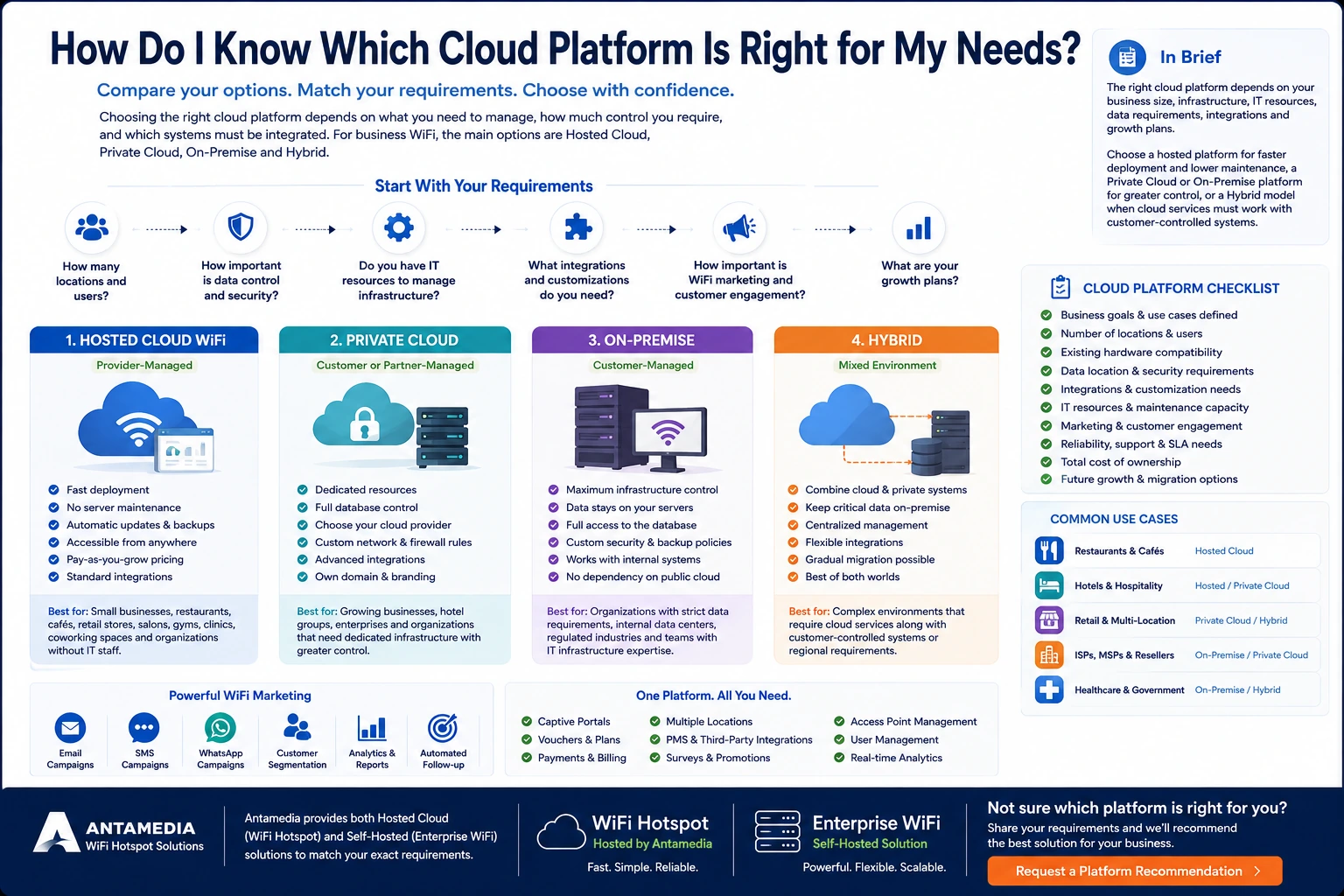
What Does a Cloud Platform Manage in a Business WiFi System?
A business WiFi platform is more than a dashboard for configuring wireless access points.
Depending on the selected solution, it may manage:
Guest authentication
Captive portals and splash pages
AAA and RADIUS communication
User accounts and vouchers
MAC addresses and registered devices
Internet plans
Session duration
Download and upload speeds
Data-transfer quotas
Paid WiFi access
Payment gateways
Hotel PMS authentication
Multiple WiFi locations
Administrator roles
Access-point management
Customer information
Surveys
Image and video promotions
Email campaigns
SMS campaigns
WhatsApp campaigns
Customer segmentation
WiFi analytics and reports
APIs and third-party integrations
The deployment model determines where these central services operate, who manages them and who is responsible when infrastructure changes or an incident occurs.
Antamedia provides WiFi Hotspot as a provider-hosted guest WiFi platform, while Enterprise WiFi System can run on a customer-controlled server or private cloud virtual machine. Both solutions use the same core platform for captive portals, authentication, vouchers, access control, payments, analytics and WiFi marketing.
Which Cloud Platform Options Should I Compare?
Before selecting a product, compare the four main deployment models.
1. Hosted Cloud WiFi
With Hosted Cloud WiFi, the software provider operates the central application, database and authentication services.
The business connects compatible routers, access points or wireless controllers to the hosted platform and manages WiFi through a web-based dashboard.
The provider normally handles:
Central application infrastructure
Database hosting
Platform updates
Application monitoring
Central backups
Platform security maintenance
Central capacity management
The customer remains responsible for its local infrastructure, including:
Internet connection
Router or gateway
Access points
Local switches and cabling
Power
Wireless coverage
Firewall configuration
Network security
Backup internet connectivity
Hosted Cloud is usually suitable when:
Fast implementation is important.
The business does not want to manage servers.
There is no internal database administrator.
Subscription-based service is preferred.
Standard platform functionality meets the requirements.
Cloud-based storage is acceptable.
The organization has one or several locations.
Infrastructure simplicity is more important than direct database control.
Main benefits
Hosted Cloud WiFi normally provides the simplest operating model.
The business can focus on users, access policies, splash pages, campaigns and reports instead of maintaining a Windows Server and Microsoft SQL Server environment.
It also allows administrators to manage several locations remotely without installing a separate central application server at every location.
Potential limitations
The business usually has less control over:
The underlying server infrastructure
Exact database configuration
Platform update timing
Custom server-level changes
Direct database access
Dedicated resource allocation
Complete white-label implementation
Highly specialized integrations
The exact limitations depend on the provider and service package.
Best suited to
Hosted Cloud WiFi is commonly suitable for:
Restaurants
Cafés and bars
Independent hotels
Small hotel groups
Retail stores
Shopping locations
Salons
Gyms
Clinics
Coworking spaces
Small and medium-sized businesses
Organizations without dedicated infrastructure teams
Antamedia WiFi Hotspot is the hosted option managed by Antamedia. It provides cloud-based captive portals, guest authentication, vouchers, payments, access limits, analytics, multiple locations and WiFi marketing without requiring the customer to operate the central platform.
2. Private Cloud Platform
A Private Cloud deployment runs the WiFi platform in an environment dedicated to one organization.
The platform may be installed on a virtual machine hosted through:
Microsoft Azure
Amazon Web Services
Google Cloud
A regional cloud provider
A private hosting company
The customer’s virtualized data center
Unlike a shared hosted service, the application and database resources are dedicated to the customer.
Private Cloud is usually suitable when:
Dedicated infrastructure is required.
The organization wants to select the hosting region.
Direct database control is required.
Private network connections are needed.
Advanced integrations must connect with internal systems.
The business needs its own domain.
White-label branding is required.
The deployment is too large or specialized for a standard hosted package.
The organization has an IT team or infrastructure partner.
Main benefits
Private Cloud can provide:
Dedicated application resources
Customer-controlled infrastructure
Private Microsoft SQL Server database
Customer-selected hosting provider
Customer-selected hosting region
Custom firewall policies
Private network connections
Advanced monitoring
Greater branding control
Own domain and certificates
More extensive integration options
Flexible infrastructure capacity
Main responsibilities
Depending on the support agreement, the customer or its infrastructure partner may need to manage:
Cloud subscription
Virtual machines
Windows Server
Microsoft SQL Server
Storage
Backups
Monitoring
Certificates
Security updates
Firewall policies
Administrator access
Disaster recovery
Capacity planning
Private Cloud provides more control, but that control creates additional operational responsibility.
Antamedia Enterprise WiFi System can be installed on a customer-controlled private cloud virtual machine and is intended for organizations that require private infrastructure, database control, their own domain, advanced branding or larger multi-location management.
3. On-Premise Platform
An On-Premise platform is installed on infrastructure controlled by the customer.
This infrastructure may be located in:
The company’s office
A central hotel data center
A private enterprise facility
A telecom or ISP network
A government data center
A colocation facility
A customer-managed virtualization cluster
The organization controls the application environment, database, network, security policy, backup procedure and maintenance schedule.
On-Premise is usually suitable when:
Data must remain within customer-controlled infrastructure.
Direct database access is required.
Public cloud hosting is restricted.
Internal systems cannot connect to an external service.
The organization already operates a reliable data center.
An experienced infrastructure team is available.
Custom security and backup policies must be applied.
Update and maintenance windows must be controlled internally.
The deployment requires extensive private integration.
Main benefits
On-Premise deployment provides direct control over:
Infrastructure location
Server configuration
Microsoft SQL Server
Database access
Data retention
Network routing
Security policies
Backup frequency
Recovery procedures
Software update timing
Internal authentication
Private integrations
Monitoring systems
Main responsibilities
The customer must provide and maintain:
Server hardware or virtualization
Operating systems
Database services
Storage
Power
Cooling
UPS and generator protection
Network connectivity
Security updates
Application monitoring
Database backups
Off-site backups
Certificates
Disaster recovery
Qualified technical staff
An On-Premise platform is not automatically more reliable or more secure than a hosted cloud platform.
Its reliability and security depend on how well the customer designs, maintains, monitors and protects the environment.
Antamedia Enterprise WiFi System is a self-hosted platform that can operate on the customer’s own server and provides control over infrastructure, domain, branding, customer hierarchy and data.
4. Hybrid Cloud Platform
A Hybrid deployment combines cloud-hosted services with customer-controlled infrastructure.
There is no single standard Hybrid architecture. The design depends on the operational, integration, data and security requirements of the organization.
A Hybrid deployment may combine:
Cloud administration with a private database
Cloud guest engagement with internal business systems
Private PMS or identity systems with a hosted captive portal
Regional servers with centralized administration
Customer-hosted SQL Server with selected cloud services
On-Premise authentication with cloud analytics
Existing legacy systems with a new cloud platform
Hybrid is usually suitable when:
Some systems must remain private.
Centralized cloud administration is still required.
The organization has legacy integrations.
Requirements differ between countries or regions.
A gradual migration is planned.
Internal databases must remain customer-controlled.
Cloud marketing or analytics must work with private operational systems.
No standard hosted or On-Premise model satisfies all requirements.
Main benefits
A Hybrid architecture can combine:
Cloud accessibility
Customer-controlled data
Existing infrastructure
Centralized management
Regional flexibility
Private integrations
Gradual migration
Custom business workflows
Main limitations
Hybrid deployments can introduce greater technical complexity.
They may require coordination between:
Software provider
Customer IT team
Cloud administrator
Database administrator
Network integrator
Security team
Third-party software provider
The project must clearly define which organization is responsible for each component, backup, update, integration and support procedure.
For Antamedia On-Premise and Hybrid projects, developers can review an existing database, adapt the required structure and prepare the information for Microsoft SQL Server when a custom database migration is required.
Cloud Platform Comparison at a Glance
Hosted Cloud WiFi
Best for: Fast deployment and low infrastructure maintenance
Central hosting: Managed by provider
Database: Provider-hosted
Updates: Managed by provider
Internal IT requirement: Low
Customization: Standard to advanced
Initial infrastructure investment: Lower
Typical payment model: Monthly or annual subscription
Private Cloud
Best for: Dedicated infrastructure with cloud flexibility
Central hosting: Customer, provider or infrastructure partner
Database: Customer-controlled
Updates: Coordinated maintenance process
Internal IT requirement: Medium to high
Customization: Advanced
Initial infrastructure investment: Medium
Typical payment model: Software plus cloud infrastructure and maintenance
On-Premise
Best for: Maximum infrastructure and data control
Central hosting: Customer-controlled
Database: Customer-controlled
Updates: Customer-controlled maintenance window
Internal IT requirement: High
Customization: Advanced
Initial infrastructure investment: Higher
Typical payment model: License or enterprise subscription plus infrastructure
Hybrid
Best for: Mixed cloud, data and integration requirements
Central hosting: Distributed between provider and customer
Database: Cloud, private or divided by function
Updates: Coordinated between responsible teams
Internal IT requirement: Medium to high
Customization: High
Initial infrastructure investment: Depends on the architecture
Typical payment model: Custom enterprise scope
How Do I Choose the Right Cloud Platform for My Business?
The decision should begin with business and operational requirements—not with a server specification or product demonstration.
The following criteria have the greatest effect on the final choice.
1. Define What the Platform Must Accomplish
Start by defining the required business outcomes.
Ask:
Will the platform provide free or paid WiFi?
Are user accounts or vouchers required?
Will guests log in with email, SMS, social login or a room number?
Must the system collect customer information?
Are surveys required?
Will WiFi be used for marketing?
Are email, SMS or WhatsApp campaigns required?
Is automatic customer follow-up required?
Must returning visitors be identified?
Are payments required?
Is PMS integration required?
Are several locations involved?
Will the system be used internally or resold to customers?
Is complete white-label branding required?
Are custom integrations required?
Is the service operationally critical?
A small business that needs guest access and marketing has different requirements from an ISP operating a branded managed WiFi service.
2. Consider the Number of Locations and Users
Scale affects licensing, administration, database volume, reporting and infrastructure.
Document:
Current number of locations
Expected locations in three years
Number of routers
Number of access points
Maximum simultaneous users
Number of registered accounts
Authentication volume
Data-retention period
Number of administrators
Reporting requirements
Expected API usage
Seasonal or event-related peaks
Hosted Cloud WiFi can manage one or multiple locations without requiring a private server environment.
Enterprise WiFi is more appropriate when the organization requires private infrastructure, customer hierarchy, reseller workflows, advanced permissions or large-scale multi-location control.
3. Decide How Much Infrastructure You Want to Manage
A platform may offer more control while also requiring more work.
Choose Hosted Cloud when you want the provider to manage the central application and database environment.
Consider Private Cloud or On-Premise when your organization is prepared to manage:
Server capacity
Storage
Windows Server
Microsoft SQL Server
Security patches
Certificates
Monitoring
Backups
Disaster recovery
Infrastructure costs
Administrator access
Do not choose On-Premise simply because it sounds more secure.
Choose it when direct infrastructure control provides a clear security, integration, regulatory or operational benefit that justifies the additional responsibility.
4. Determine Where the Data Must Be Stored
Data requirements may immediately exclude some deployment models.
Review:
Required country or region
Private data center requirements
Database access
Data ownership
Backup location
Replication
Retention periods
Deletion procedures
Personal-data requirements
Internal security policy
Cross-border data-transfer restrictions
Third-party processing requirements
Hosted Cloud is usually simpler when provider-managed storage is acceptable.
Private Cloud or On-Premise is more suitable when the organization must select the exact infrastructure, hosting region, database configuration and backup procedure.
Hybrid can be considered when only selected data or business systems must remain private.
5. Verify Existing Hardware Compatibility
The cloud platform must work with the local network.
Document the exact:
Router manufacturer and model
Access-point manufacturer and model
Wireless controller
Controller version
Firmware version
VLAN configuration
Firewall
Internet connection
Backup internet connection
RADIUS capability
External captive portal support
Network topology
Do not accept a general statement such as “we support MikroTik,” “we support TP-Link” or “we support Cisco.”
Compatibility should be confirmed for the exact model, controller and firmware version.
Antamedia WiFi Hotspot and Enterprise WiFi System work with supported RADIUS-capable routers, access points and controllers. HotspotOS can additionally provide centralized configuration and monitoring for supported access-point hardware.
6. List Every Required Integration
Integration requirements often determine whether a standard hosted platform is sufficient.
Possible integrations include:
Hotel PMS
Payment gateway
CRM or customer engagement platform
Email delivery service
SMS provider
WhatsApp provider
Active Directory
SSO
External identity provider
External RADIUS
Loyalty platform
Reservation system
POS
Billing system
Mobile application
Customer database
Business intelligence platform
REST API
Webhooks
For each integration, confirm:
Is it already available?
Which version is supported?
Is it available in the hosted platform?
Does it require Enterprise deployment?
Is custom development necessary?
Is API documentation available?
Where will integration data be processed?
Who maintains the integration?
Who provides support when communication fails?
Is a testing environment available?
A platform having an API does not automatically mean that every required workflow is supported.
The specific endpoints, authentication, fields, limits and expected results must be reviewed.
7. Evaluate Marketing and Customer Engagement Requirements
Some organizations need only controlled internet access.
Others want to use guest WiFi to build customer relationships and increase repeat visits.
Possible requirements include:
Branded splash pages
Contact-data collection
Consent management
Surveys
Image and video promotions
Time-based offers
Location-based campaigns
Email campaigns
SMS campaigns
WhatsApp campaigns
Customer segmentation
Post-visit follow-up
Inactivity campaigns
Returning-visitor analysis
Campaign reporting
Engage integration
Antamedia WiFi Marketing connects the guest login journey with splash pages, promotions, surveys, email, SMS, WhatsApp messaging, analytics and Engage workflows.
When marketing is a primary objective, ask:
How is consent collected?
Where are customer contacts stored?
Can guests be segmented?
Can campaigns run automatically?
Can messages be linked to specific locations?
Can inactive guests be contacted after 30 days?
Can returning visitors be identified?
Can campaign performance be measured?
Can the data be exported?
Can the platform connect with other marketing systems?
A platform that only displays an advertisement during login may not provide the complete customer-engagement workflow the business requires.
8. Determine the Required Level of Branding
Branding requirements range from a customized splash page to a completely independent service.
A business may need only:
Logo
Colors
Background image
Custom messages
Location-specific offers
An ISP, MSP, reseller or managed WiFi provider may require:
Own domain
Own customer portal
Own platform identity
Complete logo replacement
Branded reports
Branded email communication
Customer hierarchy
Own pricing
Partner accounts
No visible software-vendor branding
Antamedia supports branded guest-facing workflows in WiFi Hotspot, while Enterprise WiFi provides greater control over infrastructure, domains, customer hierarchy, reseller workflows and white-label service delivery.
9. Define Reliability and Support Requirements
A restaurant and an airport may both require reliable WiFi, but the business impact of an interruption is very different.
Ask:
Is WiFi complimentary or paid?
Is it part of a contracted service?
Does staff operation depend on it?
Are multiple locations dependent on the same platform?
Is a formal SLA required?
Is 24-hour support required?
Are redundant servers required?
Are two local internet connections required?
Is automatic WAN failover required?
Is backup power available?
How are incidents reported?
Who troubleshoots the local router?
Who troubleshoots the cloud platform?
Who supports third-party integrations?
Remember that platform uptime and local network uptime are not the same.
A cloud platform can remain operational while a location experiences:
ISP outage
Power failure
Router failure
Access-point problem
Firewall error
DNS problem
Incorrect RADIUS configuration
Poor wireless coverage
The platform selection should therefore be accompanied by an appropriate local network design.
10. Compare Total Cost of Ownership
Do not compare only the monthly subscription.
Hosted Cloud costs may include:
Monthly or annual subscription
Router or gateway
Access points
Initial configuration
Splash page design
Optional branding
Integrations
Email delivery
SMS delivery
WhatsApp provider fees
Additional support
Additional locations
Private Cloud costs may include:
Platform license or subscription
Cloud virtual machines
Windows Server
Microsoft SQL Server
Storage
Backups
Network traffic
Monitoring
Security services
Infrastructure administration
Database administration
Software maintenance
Disaster recovery
On-Premise costs may include:
Physical or virtual servers
Windows and SQL Server licensing
Storage
Data center space
Power
Cooling
UPS
Generator
Monitoring
Backups
Security
Technical staff
Hardware replacement
Recovery systems
Hybrid costs may include:
Hosted services
Private infrastructure
Integration development
Data synchronization
Additional security controls
Monitoring across environments
Coordinated technical support
Custom maintenance
A platform with a higher subscription may still have a lower total cost when it reduces server administration, hardware replacement, integration work, support cases and downtime risk.
11. Consider Your Internal IT Resources
The selected model should match the people available to operate it.
A small business may have:
Business owner
Restaurant manager
Reception staff
External network technician
A larger organization may have:
IT administrators
Network engineers
Database administrators
Security team
Marketing team
Regional administrators
Procurement team
External integrators
Do not choose an infrastructure model that requires daily technical work no one has been assigned to perform.
A hosted platform is generally more appropriate when the organization has limited internal IT resources.
Private Cloud, On-Premise and Hybrid models are more practical when the organization has qualified technical staff or a contracted infrastructure partner.
12. Plan for Future Growth and Migration
The platform should support both expansion and a possible future change of deployment model.
Ask:
Can new locations be added?
Can capacity be expanded?
Can more administrators be created?
Can customer hierarchy be added?
Can the system move to private infrastructure?
Can user accounts be exported?
Can MAC addresses be transferred?
Can customer data be exported?
Can historical records be migrated?
Can splash pages and branding be retained?
Can existing hardware continue to be used?
Can the database be converted?
Is migration assistance available?
How is service interruption minimized?
Antamedia WiFi Hotspot provides standard import options for user accounts and MAC addresses. For more complex On-Premise and Hybrid migrations, Antamedia developers can review the existing database, map the required fields and prepare the data for Microsoft SQL Server.
A platform should be evaluated partly by how easily the organization can expand, migrate or leave it—not only by how easily it can begin using it.
Which Platform Is Right From Different Business Perspectives?
Different stakeholders may reach different conclusions unless their requirements are evaluated together.
Small-Business Owner
A small-business owner should prioritize:
Fast setup
Predictable cost
Easy administration
Guest experience
Marketing value
Repeat visits
Useful reports
Technical support
Minimal server maintenance
A Hosted Cloud platform is usually the most practical starting point.
IT and Network Team
The technical team should prioritize:
Hardware compatibility
RADIUS communication
Firewall requirements
Hosting architecture
Monitoring
Backups
Updates
API access
Failover
Capacity
Support escalation
The right model depends on whether the IT team wants to reduce infrastructure responsibility or retain direct control.
Security and Legal Team
Security and legal teams should evaluate:
Data location
Data ownership
Administrator access
Audit records
Encryption
Retention
Deletion
Incident response
Backups
Subprocessors
Data processing agreements
Regulatory requirements
These requirements may favor Private Cloud, On-Premise or Hybrid deployment.
Marketing Team
Marketing should evaluate:
Customer data collection
Consent
Segmentation
Splash page design
Surveys
Email campaigns
SMS campaigns
WhatsApp campaigns
Automation
Repeat-visitor reporting
Campaign measurement
Multi-location targeting
A platform can be technically advanced but still unsuitable when marketing staff cannot operate the required campaigns without continuous IT assistance.
Finance and Procurement
Finance and procurement should compare:
Subscription
License
Setup fees
Infrastructure
Hardware
Support
Integrations
Communication costs
Expansion pricing
Contract duration
Renewal terms
Migration
Exit costs
Total cost of ownership
ISP, MSP or Reseller
A service provider should prioritize:
Customer hierarchy
Multi-tenant management
White-label branding
Own domains
Customer portals
Own pricing
Partner accounts
Billing
API access
Database control
Regional infrastructure
Scalability
Migration options
Enterprise WiFi is generally more suitable for ISPs, WISPs, MSPs and resellers that need to operate a complete managed WiFi service under their own brand and infrastructure.
Example Cloud Platform Decisions
Example 1: Independent Restaurant
Requirements:
One location
Two access points
Branded splash page
Guest data collection
Daily promotions
Email and WhatsApp follow-up
No internal IT department
Recommended starting model: Hosted Cloud WiFi
The restaurant gains little from operating its own Windows Server and SQL database. Its primary value comes from guest access, automated marketing, repeat-visitor data and simplified administration.
Example 2: Small Hotel Group
Requirements:
Five hotels
Central administration
Separate reports
PMS authentication
Guest surveys
Branded splash pages
Marketing campaigns
Limited internal IT resources
Recommended starting model: Hosted Cloud WiFi
Private deployment can be considered later if data, branding or integration requirements become more complex.
Example 3: National Retail Chain
Requirements:
Hundreds of locations
Central reporting
Regional administration
Customer segmentation
Marketing automation
Private integrations
Dedicated IT and security teams
Possible models: Hosted Enterprise configuration, Private Cloud or Hybrid
The decision depends primarily on data governance, integrations, capacity, infrastructure responsibility and required customization.
Example 4: ISP or Managed WiFi Provider
Requirements:
Multiple business customers
Customer hierarchy
White-label platform
Own domain
Own pricing
Thousands of access points
Reseller accounts
Direct database control
Custom billing
Recommended model: Enterprise WiFi on Private Cloud or On-Premise infrastructure
The provider needs to operate the platform as part of its own commercial service.
Example 5: Healthcare Organization
Requirements:
Several facilities
Strict network separation
Internal identity systems
Private data requirements
Central administration
Detailed administrator roles
Existing data center
Possible models: On-Premise or Hybrid
The final architecture should be reviewed by infrastructure, security and legal teams.
Example 6: International Hotel Group
Requirements:
Locations in several countries
Regional data policies
Central branding
Local PMS integrations
Shared reporting
Different administrator roles
High availability
Possible models: Private Cloud or Hybrid
Regional components can be designed around data and integration requirements while central administration remains available to the group.
Simple Decision Guide
Choose Hosted Cloud WiFi when:
You want the fastest implementation.
You do not want to manage servers.
You have one or several locations.
Subscription pricing is preferred.
Standard integrations are sufficient.
Provider-managed cloud storage is acceptable.
Lower maintenance is a priority.
Choose Private Cloud when:
You need dedicated infrastructure.
You want your own domain and database.
You have an IT team or infrastructure partner.
You need advanced integrations.
You manage a large network.
You require advanced branding.
You want infrastructure control without maintaining physical servers.
Choose On-Premise when:
Data must remain in your infrastructure.
Direct database access is required.
You already operate reliable servers.
Internal systems cannot use public cloud services.
Your organization manages backups and disaster recovery.
Security policy requires customer-hosted infrastructure.
Choose Hybrid when:
Some systems or data must remain private.
Centralized cloud management is still required.
Legacy systems must be retained.
Requirements differ between regions.
A gradual migration is required.
No standard deployment model satisfies all requirements.
Warning Signs That a Cloud Platform May Be Wrong for You
Be cautious when:
The provider recommends a platform without reviewing your requirements.
Exact hardware compatibility is not verified.
Data location is unclear.
Data ownership is not documented.
Infrastructure responsibilities are unclear.
Essential functionality is excluded from the quoted price.
Customer data cannot be exported.
APIs are advertised but documentation is unavailable.
Scaling requires replacing the complete platform.
On-Premise is recommended without discussing maintenance.
Cloud hosting is presented as eliminating all local network risks.
Hybrid is promised without a defined architecture.
White-label claims do not include domain and portal control.
There is no migration or exit procedure.
Support responsibilities are divided between vendors without a clear escalation process.
Cloud Platform Selection Checklist
Business requirements
Required business outcomes are documented.
Required login methods are defined.
Free or paid access requirements are confirmed.
WiFi marketing requirements are documented.
Reporting requirements are identified.
Expected growth is estimated.
Network
Router models are documented.
Access-point models are documented.
Controller and firmware versions are known.
RADIUS and captive portal support are verified.
Firewall requirements are documented.
Internet redundancy is reviewed.
Wireless coverage and capacity are confirmed.
Deployment
Hosted Cloud, Private Cloud, On-Premise and Hybrid options are compared.
Infrastructure responsibilities are documented.
Server and database requirements are known.
Backup responsibility is assigned.
Monitoring responsibility is assigned.
Disaster-recovery requirements are defined.
Data and security
Data ownership is confirmed.
Data location is acceptable.
Retention rules are supported.
Export and deletion procedures are documented.
Administrator roles are reviewed.
Security and incident procedures are understood.
Integrations
Required integrations are listed.
Supported versions are confirmed.
API documentation is reviewed.
Custom development is scoped.
Integration ownership is assigned.
Testing procedures are defined.
Marketing
Contact data can be collected with appropriate consent.
Customer segmentation is supported.
Email requirements are confirmed.
SMS requirements are confirmed.
WhatsApp requirements are confirmed.
Automated campaigns are supported.
Returning visitors can be analyzed.
Campaign results can be measured.
Commercial requirements
Subscription or license costs are known.
Infrastructure costs are calculated.
Setup and migration fees are included.
Support costs are documented.
Expansion pricing is understood.
Contract and cancellation terms are reviewed.
Total cost of ownership is calculated.
Future flexibility
User accounts can be exported or imported.
MAC addresses can be transferred.
Customer information can be exported.
Database migration is possible.
Existing network hardware can remain in use.
A future deployment-model change is possible.
Vendor lock-in risk is acceptable.
Which Antamedia Cloud Platform Is Right for My Needs?
Antamedia provides two primary WiFi platform options, with Hybrid architecture available for projects that require a combination of cloud and customer-controlled components.
WiFi Hotspot
WiFi Hotspot is hosted and managed by Antamedia.
It is appropriate when you need:
Faster implementation
Minimal central infrastructure maintenance
Subscription-based service
Centralized cloud administration
One or multiple locations
Captive portals
User accounts and vouchers
Access limits
Payments
Analytics
WiFi marketing
Email, SMS and WhatsApp engagement
Enterprise WiFi System
Enterprise WiFi is installed on a customer-controlled server or private cloud virtual machine.
It is appropriate when you need:
Private infrastructure
Direct database control
Own domain
Advanced white-label branding
Customer hierarchy
Reseller workflows
Large multi-location deployment
Advanced integrations
Dedicated capacity
Greater infrastructure control
Hybrid Deployment
Hybrid is appropriate when you need:
Centralized cloud services
Customer-controlled database or infrastructure
Private business integrations
Regional architecture
Existing legacy systems
A gradual migration
A custom division of responsibilities
The recommended platform should be selected after reviewing:
Number of locations
Number of access points
Expected concurrent users
Existing hardware
Login methods
Marketing requirements
Required integrations
Data policies
Branding
Internal IT resources
Reliability requirements
Expected growth
Frequently Asked Questions
How do I know which cloud platform is right for my needs?
Start by documenting what the platform must manage, your existing hardware, number of locations, expected users, data requirements, integrations, internal IT resources and plans for growth. Select the least complex platform that satisfies these requirements without creating unnecessary infrastructure or vendor dependency.
Which cloud platform is best for a small business?
A provider-hosted cloud platform is usually the most practical option because it offers faster deployment and does not require the business to maintain a central application server and database.
When should I choose Private Cloud?
Choose Private Cloud when you need dedicated resources, customer-controlled infrastructure, a private database, your own domain, advanced integrations or greater control over data location and security.
When should I choose On-Premise?
Choose On-Premise when the platform and database must operate inside customer-controlled infrastructure and the organization already has the staff, monitoring, backups and recovery procedures needed to maintain it.
What is a Hybrid cloud platform?
A Hybrid platform combines cloud services with customer-controlled infrastructure. It may keep selected data, authentication or integrations private while using cloud services for administration, analytics or guest engagement.
Is Cloud WiFi less expensive than On-Premise?
Hosted Cloud usually has a lower initial infrastructure cost. On-Premise can be appropriate for larger organizations that already operate servers and technical teams. The final comparison should include infrastructure, software, staff, backups, monitoring, support and disaster recovery.
Is On-Premise more secure than Cloud?
Not automatically. On-Premise provides more control, but its security depends on configuration, updates, monitoring, backups, access management and staff expertise. A properly managed cloud environment may be more secure than a poorly maintained private server.
Can I use my existing routers and access points?
This depends on the exact router, access point, controller and firmware version. Compatibility should be verified before selecting the platform or purchasing additional hardware.
Can I use my own cloud provider?
Enterprise WiFi can run on a customer-controlled private cloud virtual machine when the environment meets the required operating system, Microsoft SQL Server, networking and capacity requirements.
Which model provides the most branding control?
Enterprise WiFi generally provides the greatest control over the platform domain, customer portal, infrastructure, customer hierarchy and white-label service identity.
Which platform is better for an ISP or MSP?
Enterprise WiFi is generally more appropriate for ISPs, WISPs, MSPs and resellers that require private infrastructure, customer hierarchy, white-label branding, custom pricing and direct database control.
Can I move from Hosted Cloud to On-Premise later?
Migration may be possible, but the scope depends on user accounts, device records, database structure, passwords, historical information and integrations. The migration path should be reviewed before the initial deployment.
Can I import data from another WiFi platform?
Standard user-account and MAC-address imports are available. For complex On-Premise or Hybrid migrations, an existing database can be reviewed and the required data adapted for Microsoft SQL Server.
Does Hybrid mean the WiFi will work without an internet connection?
Not necessarily. Hybrid describes how platform components are distributed. Offline access depends on the router, controller, authentication method, session configuration and exact architecture.
How should I make the final decision?
Compare the deployment models using the same documented requirements. Verify hardware compatibility, calculate total cost, review data and security obligations, test integrations and complete a pilot deployment before a large rollout.
Choose the Platform Around Your Requirements
There is no single cloud platform that is right for every business.
Hosted Cloud WiFi is usually the most efficient option when speed, simplicity and lower maintenance are the priorities.
Private Cloud or On-Premise Enterprise WiFi is more appropriate when the organization requires dedicated infrastructure, direct database control, advanced branding, private integrations or greater control over data.
Hybrid deployment is useful when centralized cloud services must work with customer-controlled systems.
The best platform is not the one with the most infrastructure or the longest feature list. It is the option that delivers the required business value with an acceptable level of cost, responsibility, complexity and future flexibility.
CTA Heading: Find the Right Cloud Platform for Your WiFi Network
Provide your number of locations, access points, expected users, hardware models, required login methods, integrations, marketing requirements and preferred hosting model. Antamedia can review your requirements and recommend the appropriate Hosted Cloud, Private Cloud, On-Premise or Hybrid architecture.