
Can Cloud WiFi Handle My Network Traffic?
In Brief
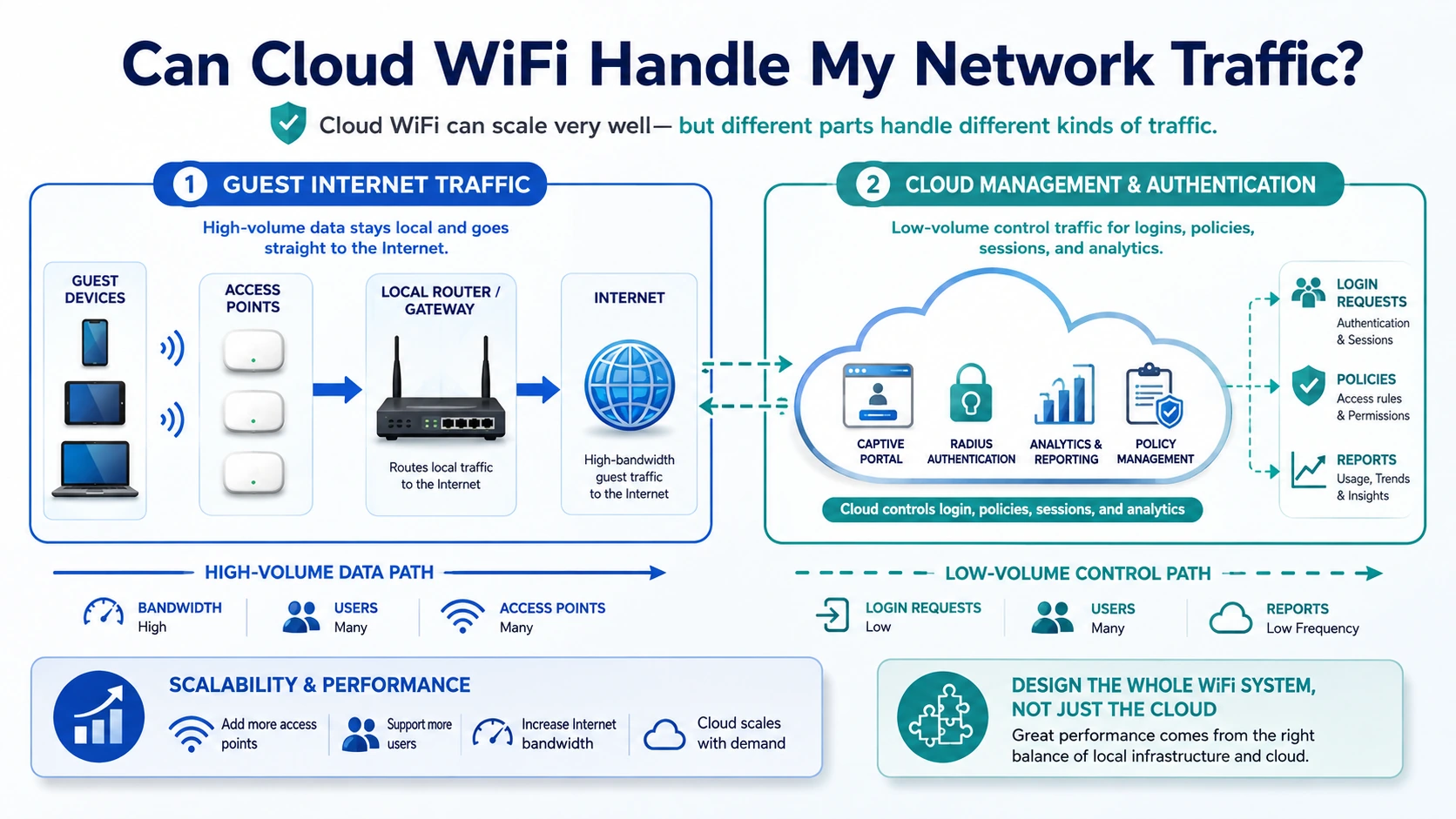
Cloud WiFi can handle growing numbers of users, access points and locations when both the cloud platform and the local network are designed for the expected load. In most captive portal and RADIUS deployments, the cloud manages login pages, authentication, access policies, sessions and reporting, while the local router, access points and internet connection carry the guest’s actual internet traffic.
Can Cloud WiFi handle my network traffic? In most properly designed deployments, yes.
However, the answer does not depend on the cloud platform alone.
A business WiFi service includes several connected systems:
Internet connection
Router or gateway
Switches and cabling
Access points
Wireless spectrum
Captive portal
RADIUS authentication
Cloud application
Database
Reports and analytics
External integrations
Each component handles a different type of workload.
A cloud platform may have sufficient capacity for thousands of authentication requests, while a local access point becomes overloaded by 60 active devices. A location may have powerful WiFi 6 access points but still experience poor performance because its internet connection is too slow. A fast internet connection may also remain underused because the router cannot process enough concurrent sessions.
The correct question is therefore not only whether the cloud can handle the traffic.
It is:
Can the complete WiFi architecture handle the expected users, applications, authentication activity and peak demand?
Does All Guest Internet Traffic Pass Through the Cloud?
Usually not.
In a typical external captive portal and RADIUS deployment, the cloud platform is primarily part of the management and authentication path, while the local router or gateway remains part of the internet data path.
When a guest connects:
The device connects to a local access point.
The local router or controller redirects the guest to the captive portal.
The cloud platform displays the login page.
The user submits the required credentials or access method.
The cloud platform and RADIUS service validate the request.
The router receives the authorization result.
The router allows the device to use the local internet connection.
Session and usage information may be sent back to the cloud platform.
Antamedia’s documented UAM workflow follows this model: unauthenticated users are redirected to an external web page, credentials are checked through the centralized database and RADIUS service, and the local device changes the client status to authenticated after successful authorization. This indicates that the cloud is primarily controlling access rather than carrying every byte of the guest’s internet traffic. The exact path still depends on the router, controller and network topology.
This distinction is important.
If 500 guests stream video, the largest volume of traffic usually travels through:
The local access points
Local switches
The router or gateway
The business internet connection
The cloud platform primarily handles:
Captive portal requests
Authentication
Access-plan assignment
Session control
RADIUS accounting
Device and user records
Administration
Analytics
Reports
Cloud scalability and internet bandwidth are therefore related, but they are not the same measurement.
What Types of Traffic Must Be Considered?
Network traffic should be divided into several categories.
1. Guest Internet Traffic
This is the traffic generated when users:
Browse websites
Stream video
Join video calls
Use social media
Download files
Play online games
Use cloud applications
Install updates
Guest traffic is usually the largest bandwidth consumer.
It primarily affects:
Internet connection capacity
Router throughput
Firewall performance
Switch capacity
Access-point capacity
Wireless airtime
The Cloud WiFi platform cannot create additional internet bandwidth. It can apply limits and policies that help distribute available capacity more fairly.
2. Captive Portal Traffic
Captive portal traffic includes:
Loading the login page
Downloading images and page resources
Submitting login forms
Processing free access
Validating vouchers
Displaying video or image promotions
Redirecting users after login
This traffic is normally much smaller than continuous video streaming, but it can arrive in large bursts.
For example, when hundreds of conference attendees enter a venue at the same time, many devices may attempt to open the portal within several minutes.
The platform must therefore handle both:
Total daily usage
Short authentication peaks
A network with 5,000 users spread across a day may create less stress than 1,000 users trying to connect during the same ten-minute interval.
3. RADIUS Authentication Traffic
RADIUS handles requests such as:
Access-Request
Access-Accept
Access-Reject
Accounting-Start
Interim accounting updates
Accounting-Stop
Each individual RADIUS packet is small.
The capacity concern is usually the number and frequency of requests rather than their total bandwidth.
RADIUS load increases with:
More users
More login attempts
Shorter session duration
Frequent reconnects
More access points
Short accounting intervals
Failed authentication attempts
Device roaming behavior
Multiple locations
The RADIUS service, database and gateway configuration must be sized for the expected request rate.
4. Management and Monitoring Traffic
Cloud-managed access points and controllers may send:
Device status
Connected-client counts
Bandwidth statistics
CPU and memory data
Configuration updates
Health checks
Firmware information
Monitoring events
Where access points or wireless controllers provide cloud management, they may report device status, connected-client counts, bandwidth usage, hardware health, and other operational metrics. These infrastructure metrics complement the authentication, session, user, and bandwidth data available from the guest WiFi platform.
This traffic is usually modest compared with guest streaming, but it grows with the number of devices and monitoring frequency.
5. Reporting and Database Traffic
The platform may store:
Login records
User accounts
MAC addresses
Session start and stop times
Bandwidth usage
Voucher activity
Payments
Location data
Campaign activity
Survey responses
Administrator actions
Database workload depends on:
Number of users
Number of active sessions
Accounting frequency
Data-retention period
Report complexity
Number of administrators
API use
Marketing activity
A large deployment may have moderate guest bandwidth but significant database activity because it retains detailed records across many locations.
6. Integration Traffic
The WiFi login process may communicate with:
Hotel PMS
Payment gateway
SMS gateway
WhatsApp provider
Email delivery service
Identity provider
Social login platform
CRM
Customer database
External API
These services can affect login speed even when the cloud platform and local network are functioning correctly.
For example, a hotel guest may experience a delayed room-number login because the PMS response is slow.
Performance analysis should therefore include both the WiFi platform and every service required by the selected authentication method.
What Actually Determines WiFi Performance?
Cloud WiFi performance depends on several independent capacity layers.
1. Internet Connection Capacity
The internet connection determines how much total external traffic the location can carry.
Important measurements include:
Download bandwidth
Upload bandwidth
Latency
Packet loss
Jitter
Provider contention
Reliability
Backup connectivity
A 1 Gbps internet service does not always deliver 1 Gbps to every user.
The available capacity is shared between:
Guest devices
Staff devices
Operational systems
POS terminals
Security cameras
Cloud backups
Building systems
Other business applications
Guest and operational traffic should be separated and prioritized according to business requirements.
Average demand matters more than advertised device speed
A WiFi plan may permit each user to download at 20 Mbps, but this does not mean that every connected user continuously consumes 20 Mbps.
Capacity planning should consider:
Number of connected users
Number of actively transmitting users
Average traffic per active user
Peak demand
Type of applications
Required service quality
For example, 200 connected devices may include:
50 inactive devices
80 light browsing devices
40 social media users
20 video streams
10 video calls
This traffic profile is more useful than the connected-device count alone.
2. Router and Gateway Performance
The router is often the main local traffic-control point.
It may handle:
NAT
Firewall
VLANs
DHCP
Captive portal
RADIUS
Bandwidth shaping
Session tracking
WAN failover
VPN
DNS
Content policies
Router performance should not be evaluated only from the manufacturer’s maximum routing-speed claim.
Real-world capacity can decrease when the router also performs:
Stateful firewall inspection
Per-user queues
Captive portal processing
Large numbers of NAT sessions
VPN encryption
Complex firewall rules
Traffic accounting
Important router measurements include:
Real throughput with required features enabled
Maximum concurrent sessions
Packet-per-second capacity
CPU utilization
Memory utilization
Queue performance
Number of supported hotspot users
Failover capability
A router that can forward 1 Gbps in a simple laboratory test may not maintain the same speed with thousands of active sessions and extensive traffic shaping.
3. Access-Point Capacity
Access points determine how devices share the wireless medium.
Performance depends on:
WiFi generation
Radio count
Channel width
Channel availability
Frequency band
Signal strength
Interference
Client capabilities
Antenna design
Access-point placement
Number of active clients
Airtime usage
A manufacturer’s maximum wireless data rate is not the same as usable network throughput.
Wireless capacity is shared between devices connected to the same radio.
A single slow or distant client can also consume disproportionate airtime because the access point must transmit at a lower data rate.
Adding more users without adding properly planned access points can reduce performance even when the internet connection and cloud platform have unused capacity.
4. Wireless Coverage and Interference
A user with poor signal may report that “the cloud WiFi is slow,” even though the cloud platform is responding normally.
Common radio problems include:
Access points too far apart
Access points too close together
Excessive transmit power
Weak signal in rooms or corridors
Channel overlap
Non-WiFi interference
Poor 5 GHz or 6 GHz coverage
Incorrect access-point placement
Obstructions and building materials
A wireless site survey is recommended for hotels, hospitals, warehouses, campuses, event venues and other complex locations.
Cloud management can provide visibility and configuration tools, but it cannot replace correct RF design.
5. Switches and Cabling
The wired network connects access points to the router and internet gateway.
Potential limitations include:
100 Mbps switch ports
Oversubscribed uplinks
Damaged cables
Incorrect VLAN trunks
Insufficient PoE power
Duplex negotiation problems
Switch CPU limitations
Spanning-tree problems
Congested aggregation links
A WiFi 6 access point connected to a 100 Mbps Ethernet port cannot deliver more than the capacity of that wired link.
High-performance access points may require:
Gigabit Ethernet
2.5 Gigabit Ethernet
Sufficient PoE or PoE+
Proper switch uplinks
6. Cloud Authentication and Database Capacity
The cloud platform must handle:
Portal page requests
Login validation
RADIUS requests
Session creation
Accounting updates
Database writes
Administrative requests
Reports
APIs
Marketing workflows
Cloud applications can scale vertically by adding resources to existing systems or horizontally by adding more service instances. Microsoft’s architecture guidance recommends designing scaling around actual and predicted workload patterns rather than assuming that one resource configuration will suit every level of demand.
Antamedia Enterprise WiFi System can be expanded across multiple servers to increase platform capacity as deployment requirements grow. Central components such as the captive portal, RADIUS service, and database can be sized according to the required architecture.
7. Captive Portal Design
The portal itself affects login performance.
Large pages containing:
Uncompressed images
Autoplay video
External scripts
Third-party tracking
Custom fonts
Several external resources
may load slowly on mobile devices or weak internet connections.
The captive portal should be:
Lightweight
Mobile responsive
Optimized for fast loading
Hosted through HTTPS
Tested through captive network assistants
Limited to necessary scripts
Designed with compressed images
A simple portal can handle peak connection periods more effectively than a visually complex page that downloads several megabytes before login.
What Does Scalability Mean for Cloud WiFi?
Scalability is the ability of the complete system to support growth without unacceptable loss of performance. Businesses should also consider cloud WiFi reliability when planning capacity for critical locations.
Growth may include:
More users
More access points
More locations
More login requests
More data records
More reports
More administrators
More API calls
More marketing campaigns
More integrations
A system may scale in one dimension but not another.
For example:
A router may support additional users but not additional throughput.
A cloud portal may support more logins but the database may become slow.
A location may have sufficient bandwidth but insufficient wireless airtime.
The platform may support more locations but the support team may lack monitoring procedures.
A useful scalability plan must therefore consider the entire architecture.
Cloud WiFi Scaling Layers
Access-point scaling
Add properly planned access points when:
Coverage is insufficient
Radios are overloaded
Client counts are too high
Airtime utilization is excessive
More capacity is required in a specific area
Additional access points should be planned and managed through the relevant network hardware or controller platform, while the guest WiFi platform continues to provide centralized authentication and access policies across supported locations.
Internet scaling
Increase or add internet capacity when:
WAN utilization regularly approaches the available limit
Video calls experience congestion
Upload traffic affects download performance
Peak periods cause high latency
Business and guest applications compete for bandwidth
Options include:
Faster primary ISP
Secondary ISP
Load balancing
Automatic failover
Separate operational and guest connections
Regional internet breakout
Router scaling
Upgrade or distribute gateway capacity when:
Router CPU remains high
NAT session tables approach limits
Bandwidth queues reduce performance
Firewall processing becomes a bottleneck
One gateway serves too many locations or users
Cloud application scaling
Expand platform capacity when:
Portal response times increase
Authentication queues appear
RADIUS response time increases
Database operations slow down
Reports affect live operations
API traffic increases
More geographic regions are required
Operational scaling
Improve management processes when:
Administrators cannot identify problems quickly
Monitoring alerts create excessive noise
Configuration becomes inconsistent
Support responsibilities are unclear
Large changes are performed manually
New locations take too long to activate
Scalability is not only a server question. It also includes administration, monitoring and support procedures.
How Should I Estimate Required Internet Bandwidth?
A practical starting formula is:
Active users × average bandwidth per active user = estimated traffic demand
Then add headroom for:
Short traffic bursts
Software updates
Events
Future growth
Protocol overhead
Unexpected usage
Do not calculate capacity only by multiplying every user by the maximum permitted speed.
That would often produce an unrealistic number because not every device continuously uses its full allowance.
Illustrative Example
Assume a hotel has:
400 connected devices
200 devices actively using the internet during the peak period
An estimated average of 2 Mbps per active device
Estimated demand:
200 × 2 Mbps = 400 Mbps
With approximately 30% operational headroom:
400 Mbps × 1.3 = 520 Mbps
A 500 Mbps connection would be close to the calculated requirement and could become congested during bursts.
A 750 Mbps or 1 Gbps service may provide a more practical margin, depending on:
Upload requirements
Video-call usage
Staff traffic
Camera traffic
Backup processes
ISP performance
Expected growth
This is an illustrative calculation, not a universal recommendation.
Real capacity planning should use measured traffic whenever possible.
How Many Users Can One Access Point Handle?
There is no reliable universal number.
An access point may technically associate with many devices while providing poor service to far fewer active users.
The practical capacity depends on:
Access-point model
Radio specifications
WiFi standard
Client behavior
Channel width
Interference
Required applications
Signal quality
Airtime utilization
Bandwidth expectations
A lecture hall with 100 users performing light browsing is different from 100 users joining simultaneous video calls.
Do not size access points only by the maximum client count in the data sheet.
Use:
Site survey
Expected active-client count
Application profile
Radio-capacity planning
Peak tests
Real monitoring data
How Many Users Can Cloud WiFi Authenticate?
Cloud authentication capacity depends on:
Number of simultaneous login requests
RADIUS processing capacity
Database performance
Portal complexity
Session rules
Accounting frequency
External integrations
Deployment architecture
The most important value is often not the total number of registered users.
It is the expected peak authentication rate.
Example: Event Login Peak
An event venue expects 1,200 attendees to connect within 15 minutes.
That represents an average of approximately:
1,200 ÷ 900 seconds = 1.33 login attempts per second
The actual peak may be higher because arrivals are not evenly distributed.
The platform should therefore be tested for:
Concurrent portal page loads
Authentication requests
Failed retries
SMS or OTP delivery
Database writes
Redirect performance
Router response
Large events should be tested before the production date rather than relying only on daily user totals.
Does Bandwidth Limiting Improve Performance?
Bandwidth limits can improve fairness and protect the network from individual users consuming excessive capacity.
Antamedia Internet Plans can define:
Download speed
Upload speed
Transfer quota
Session duration
Daily limits
Expiration
Device limits
Access schedules
These policies can be applied through both WiFi Hotspot and Enterprise WiFi System.
For example, a business with a 500 Mbps connection may provide:
5 Mbps free access
20 Mbps premium access
Higher limits for staff
Separate limits for conference guests
However, bandwidth limits do not create additional capacity.
If the internet connection, router or access points are already overloaded, limiting users may improve distribution but will not solve the underlying infrastructure shortage.
Can Cloud WiFi Handle Video Streaming?
Yes, provided the local network has enough capacity.
Video streaming primarily consumes:
WAN bandwidth
Router throughput
Wireless airtime
The cloud platform controls whether the user is authorized and which speed or quota applies.
It normally does not determine the physical capacity of the ISP line or access point.
For streaming-heavy environments, consider:
Higher WAN capacity
WiFi 6 or newer access points
5 GHz or 6 GHz client use
Adequate AP density
Per-user speed limits
Application-aware policies where supported
Separate business and guest traffic
Monitoring during peak periods
Can Cloud WiFi Handle Multiple Locations?
Yes.
Centralized Cloud WiFi is particularly useful when an organization manages:
Hotel groups
Restaurant chains
Retail stores
Campuses
Hospitals
Transport systems
Shopping centers
Managed WiFi customers
Public networks
The platform can centralize:
Locations
Users
Access policies
Splash pages
Authentication
Reports
Administrator roles
Marketing campaigns
However, each location still requires suitable local capacity.
One location may have:
50 Mbps internet
Two access points
30 peak users
Another may have:
2 Gbps internet
80 access points
2,000 peak users
Both can use the same central management concept, but they should not use the same local network design.
Can One Cloud WiFi Platform Support Different Traffic Policies?
Yes.
Different locations, groups or users can receive different Internet Plans and policies.
Examples include:
Free basic access
Premium paid access
Hotel guest access
Conference access
Staff access
VIP access
Resident access
Tenant subscriptions
Event vouchers
Time-limited access
Policies can define:
Speed
Quota
Session duration
Expiration
Number of devices
Schedule
Allowed locations
Pricing
This helps organizations protect shared capacity and provide different service levels without maintaining separate platforms.
What Happens During Peak Usage?
Peak usage may affect different components in different ways.
Portal peak
Many devices open the captive portal at the same time.
Possible symptoms:
Slow login-page loading
Delayed redirects
Form submission retries
Authentication peak
Many devices submit credentials or vouchers simultaneously.
Possible symptoms:
Higher RADIUS response time
Authentication retries
Delayed account creation
Internet traffic peak
Many authenticated users stream, download or join calls.
Possible symptoms:
High latency
Buffering
Packet loss
Slow browsing
Access-point peak
Too many active users share one radio.
Possible symptoms:
Low throughput
High retransmission
Devices disconnecting
Poor roaming
Database peak
Many sessions, accounting records or reports are processed.
Possible symptoms:
Slow dashboards
Delayed reports
Increased write latency
Monitoring should identify which component reaches its limit.
Increasing cloud capacity will not fix an overloaded access point, and adding access points will not fix an undersized database.
How Can I Prevent Cloud WiFi Performance Problems?
1. Measure Current Usage
Collect:
Number of connected users
Active users
Peak usage time
WAN bandwidth
Upload and download utilization
Router CPU and memory
Access-point client count
Access-point bandwidth usage
Authentication success and failure
RADIUS response time
Session volume
Guest WiFi analytics should be combined with router, access-point, controller, and WAN monitoring data to identify where a performance bottleneck actually occurs.
2. Design for Peak Demand
Do not size the network only for average usage.
Consider:
Breakfast, lunch and dinner peaks
Hotel check-in periods
Conferences
School breaks
Stadium entry
Product launches
Public events
Seasonal tourism
Software-update periods
3. Add Capacity Before the Limit Is Reached
Do not wait for every component to operate at maximum capacity.
Maintain headroom for:
Traffic bursts
Failover
Growth
Maintenance
Unexpected client behavior
4. Use Appropriate Internet Plans
Apply realistic user limits to protect fairness.
Avoid offering a maximum speed that the location cannot support during peak periods.
5. Optimize the Captive Portal
Use:
Compressed WebP images
Minimal scripts
Short forms
Mobile-responsive layouts
Fast external resources
Tested redirects
6. Test Authentication Under Load
Before opening a large venue or event, simulate:
Concurrent portal requests
Multiple login attempts
OTP delivery
Voucher validation
PMS requests
Failed login retries
7. Monitor External Integrations
Track the performance of:
PMS
Payment gateways
SMS
WhatsApp
Identity providers
APIs
8. Use Redundant Connectivity
For critical networks, consider:
Two ISPs
Automatic WAN failover
4G or 5G backup
Backup power
Redundant gateways
9. Review Accounting Frequency
Very frequent RADIUS accounting updates produce more current data but also increase request and database volume.
The interval should balance:
Reporting accuracy
Session control
Database load
Network overhead
10. Plan for Growth
Review capacity when:
New locations are added
Access-point count increases
More users are registered
Login methods change
Marketing activity increases
Data retention is extended
New reports or APIs are introduced
Which Antamedia Platform Is Suitable for My Traffic Level?
Review how to choose the right cloud platform before deciding between a hosted and self-hosted deployment. Antamedia offers two primary options.
WiFi Hotspot
WiFi Hotspot is hosted and managed by Antamedia.
It is designed for organizations that want:
Faster setup
Hosted captive portal
Hosted RADIUS
Lower infrastructure maintenance
One or multiple locations
User and bandwidth controls
Payments
Analytics
WiFi marketing
Antamedia WiFi Hotspot is designed for hosted guest WiFi deployments where organizations want Antamedia to manage the central platform infrastructure. The appropriate deployment size depends on simultaneous users, authentication peaks, integrations, data volume, and operational requirements—not only the number of access points.
Enterprise WiFi System
Enterprise WiFi runs on a customer-controlled server or private cloud virtual machine.
It is more appropriate when the deployment requires:
Large access-point count
Large simultaneous-user count
Multiple customers
Dedicated infrastructure
Private database
Own domain
Advanced integrations
White-label service
Reseller operation
Custom scaling
Antamedia Enterprise WiFi is designed for hotel groups, retail chains, ISPs, managed service providers, governments and other organizations managing multiple venues or customers from a private platform. Its architecture can be expanded across multiple servers as access-point and simultaneous-user requirements increase.
When Should I Move From Hosted WiFi Hotspot to Enterprise WiFi?
Consider Enterprise WiFi when:
The network grows beyond the intended hosted deployment profile.
Dedicated resources are required.
You need direct database control.
You require your own domain and complete platform branding.
You manage many business customers.
You need customer or reseller hierarchy.
Private integrations are required.
Data must remain in customer-controlled infrastructure.
The platform must scale across several servers.
Custom capacity planning is required.
A business can begin with hosted WiFi Hotspot and move to Enterprise WiFi when private infrastructure, larger scale or reseller-level management becomes necessary.
Information Required for a Capacity Review
Before selecting a platform or network design, provide:
Deployment size
Number of locations
Number of access points
Expected growth
Number of administrators
User demand
Maximum connected users
Maximum active users
Expected simultaneous logins
Average session duration
Daily login volume
Traffic profile
Web browsing
Social media
Video streaming
Video calls
Large downloads
Business applications
Expected average bandwidth per active user
Local network
Router model
Access-point models
Controller model and version
Switches
Ethernet uplinks
VLAN design
Firewall
Internet connection
Backup internet
Authentication
Free access
Vouchers
Email
SMS or OTP
PMS
Social login
Payment
External identity provider
Data requirements
Accounting interval
Data-retention period
Reports
API use
Customer data
Marketing campaigns
Without this information, a capacity recommendation is only an estimate.
Cloud WiFi Performance Red Flags
Scalability should be evaluated together with the main disadvantages of Cloud WiFi, including internet dependency, vendor reliance and hardware limitations.
Review the network when:
Router CPU remains consistently high.
Access points repeatedly reach high client counts.
WAN utilization remains close to maximum.
Portal loading slows during peak periods.
Authentication retries increase.
RADIUS response times increase.
Users repeatedly reconnect.
Accounting records arrive late.
Reports affect live-system performance.
One location performs significantly worse than others.
Adding users requires manual platform changes.
The provider cannot explain deployment limits.
Exact hardware compatibility is not verified.
No capacity test is performed before a major event.
Cloud WiFi Capacity Checklist
Internet connection
Peak bandwidth demand has been estimated.
Upload capacity has been reviewed.
Operational and guest traffic are separated where required.
Headroom is available.
Backup connectivity is configured where needed.
Router and gateway
Real throughput with enabled features is known.
Concurrent-session capacity is sufficient.
CPU and memory are monitored.
Bandwidth queues are tested.
Failover has been verified.
Access points
Coverage has been surveyed.
AP density matches expected demand.
Channel planning is complete.
Wired uplinks are sufficient.
PoE capacity is sufficient.
Client counts and airtime are monitored.
Cloud platform
Expected access-point count is documented.
Simultaneous users are estimated.
Peak login rate is estimated.
Accounting frequency is defined.
Data retention is defined.
API and report demand are reviewed.
Scaling options are documented.
Captive portal
Page size is optimized.
Images are compressed.
Forms are short.
Android and iOS are tested.
Login peaks are tested.
Fallback login is available where required.
Integrations
PMS response time is tested.
Payment flow is tested.
SMS or OTP delivery is tested.
External API limits are known.
Support ownership is defined.
Alternative access is available during integration failure.
Frequently Asked Questions
Can Cloud WiFi handle heavy network traffic?
Yes, when the local internet connection, router, access points and cloud services are correctly sized. Heavy guest traffic usually affects the local data path more than the cloud management platform.
Does all WiFi traffic go through the cloud?
Not usually. In common captive portal and RADIUS deployments, authentication and management use the cloud, while guest internet traffic is routed locally through the gateway and ISP. The exact path depends on the deployment architecture.
Will Cloud WiFi make my internet faster?
No. Cloud WiFi can improve management, apply bandwidth policies and provide better visibility, but it cannot increase the capacity of the internet connection or wireless spectrum.
How many users can Cloud WiFi support?
There is no universal number. Capacity depends on the platform architecture, login rate, access points, router, internet connection, database, integrations and user behavior.
How many users can connect to one access point?
The practical number depends on the access-point model, radio design, signal, interference and applications. The maximum associated-client figure in a data sheet should not be used as the expected performance capacity.
Can Cloud WiFi handle video streaming?
Yes, provided the local internet connection, router and access points have enough capacity. User speed and quota limits can help distribute bandwidth fairly.
Can I limit bandwidth for each guest?
Yes. Antamedia Internet Plans can control download and upload speed, data quota, session duration, expiration, device limits and schedules.
Can Cloud WiFi support thousands of users?
Yes, with an appropriately designed Enterprise architecture, sufficient RADIUS and database capacity and correctly sized local networks. Large deployments may require dedicated or multiple servers.
Is access-point count enough to select a platform?
No. Also consider simultaneous users, login peaks, traffic profile, integrations, accounting frequency, data retention and required reports.
What causes slow captive portal login?
Possible causes include local internet latency, DNS, portal page size, router configuration, RADIUS response time, database load, external integrations or the user’s device.
Can a slow PMS make hotel WiFi login slow?
Yes. If room-based authentication requires a PMS response, the login process may wait for that external system even when the WiFi platform is working normally.
Do bandwidth limits guarantee good WiFi performance?
No. Limits improve fairness, but they cannot correct weak coverage, interference, insufficient WAN bandwidth or an overloaded router.
Should I use two internet connections?
A secondary connection is recommended when WiFi is commercially or operationally important. Automatic failover should be tested with portal and RADIUS communication.
When should I use Enterprise WiFi instead of hosted WiFi Hotspot?
Use Enterprise WiFi when you need private infrastructure, greater scale, dedicated resources, direct database access, own domain, customer hierarchy, advanced integrations or reseller operation.
Can Cloud WiFi scale across multiple locations?
Yes. Locations can share centralized management while retaining individual routers, internet connections, access points, policies, branding and reports.
How do I know whether my network is overloaded?
Monitor WAN utilization, router CPU, concurrent sessions, access-point client counts, airtime, authentication response times, packet loss and user experience during peak periods.
Plan Capacity Across the Complete WiFi System
Cloud WiFi can support substantial network growth, but performance depends on more than cloud server capacity.
The complete design must account for:
Internet bandwidth
Router throughput
Wireless capacity
Access-point placement
Wired infrastructure
Authentication rate
Database activity
External integrations
Monitoring
Future growth
In most captive portal and RADIUS deployments, the largest guest traffic volume remains on the local network. The cloud platform provides the centralized control, authentication, policy, analytics and management layer.
The best results come from sizing both layers together.
Check Whether Your WiFi Can Handle Peak Traffic
Provide your number of locations, access points, expected users, router models, internet speeds, login methods, and peak usage profile. Antamedia can review the complete architecture and recommend the appropriate WiFi Hotspot or Enterprise WiFi System deployment.