
Is Cloud WiFi More Secure Than Traditional Networks?
In brief: Cloud WiFi can be more secure than a traditionally managed wireless network because it centralizes configuration, monitoring, access policies, and administrative control. However, moving WiFi management to the cloud does not automatically make the network secure. Protection still depends on proper network segmentation, strong administrator authentication, secure access points, firewall policies, encryption, software updates, and responsible data management.
When businesses compare Cloud WiFi with a traditional network, security is usually the first concern. Some organizations worry that managing WiFi through an online platform creates additional exposure. Others assume that a cloud-managed system is automatically protected because the provider handles the infrastructure.
Neither assumption tells the full story.
Cloud WiFi changes where and how the network is managed. It can reduce configuration errors, improve visibility, and make security policies easier to enforce across multiple locations. At the same time, the business and the platform provider still share responsibility for protecting administrator accounts, network equipment, guest data, and local infrastructure. NIST guidance treats wireless security as a combination of secure configuration, access control, monitoring, and ongoing maintenance rather than a feature provided by one technology alone.
What Cloud WiFi Security Actually Means
Cloud WiFi is a network model in which configuration, monitoring, access policies, and often guest authentication are managed through a centralized online platform. The access points, routers, switches, and internet connection remain at the physical location. The cloud platform provides the administrative and service-control layer.
A traditional network is usually managed locally. An administrator may connect directly to each router, access point, or on-site controller to change passwords, create SSIDs, review users, or troubleshoot a problem. This model can be secure when it is correctly maintained, but it becomes harder to manage consistently as the organization adds more devices and locations.
The radio signal itself is not safer because the management platform is in the cloud. Both cloud-managed and locally managed networks can use modern wireless encryption, firewalls, VLANs, RADIUS authentication, and secure access points. The main security difference is operational: Cloud WiFi gives administrators one place to apply, review, and monitor those controls.
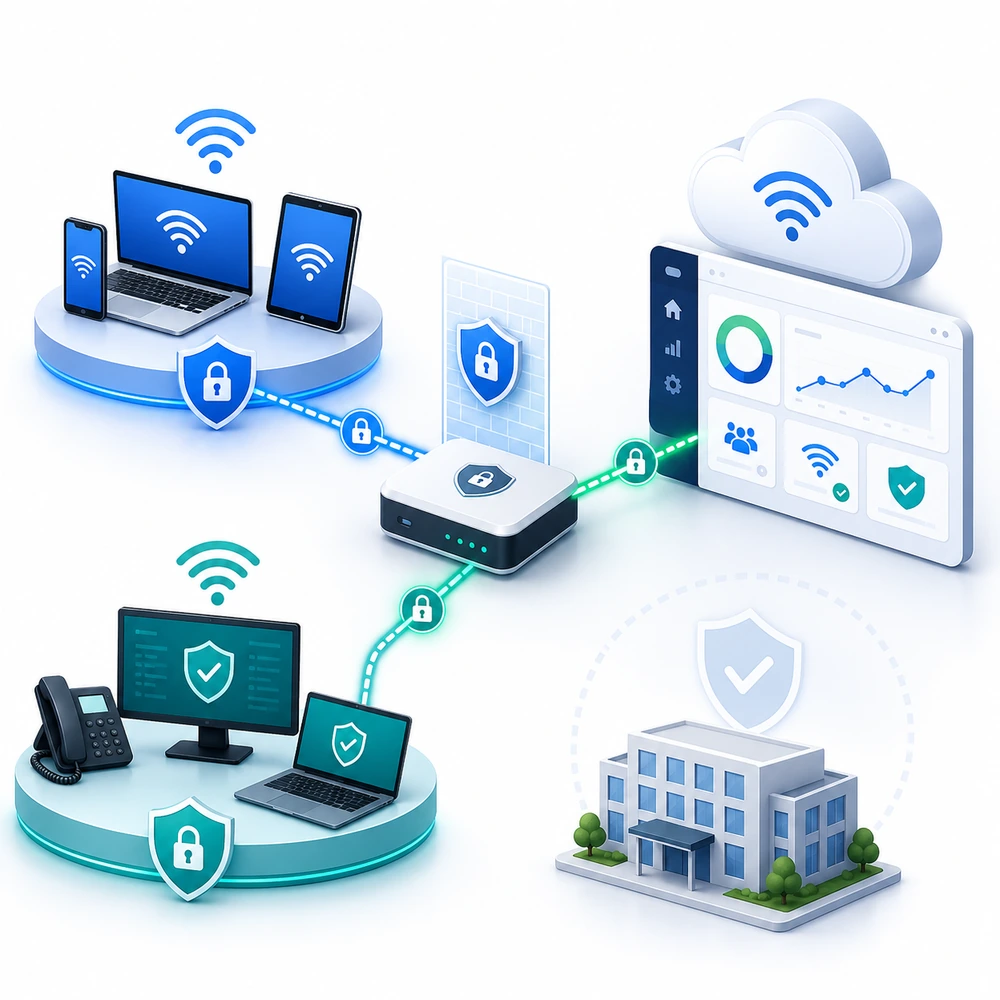
Why Cloud Management Can Improve WiFi Security
Practical example: security across multiple hotel locations
Consider a hotel group where every property manages its WiFi independently. One location may have the correct guest-network isolation, while another may still use an outdated administrator password or an incorrect firewall rule. With centralized Cloud WiFi management, the IT team can review locations from one dashboard, apply consistent access policies, identify configuration differences, and respond without depending entirely on local staff.
The cloud platform does not replace secure routers, VLANs, or firewall rules, but it makes those controls easier to supervise across the entire group.
The most important advantage of Cloud WiFi is centralized control. Instead of relying on separate configurations at every venue, administrators can define policies from one dashboard and apply them across the network.
This reduces configuration drift. Without centralized management, one hotel may use the correct guest-network policy while another location still has an old password, outdated firmware, unrestricted administrator account, or incorrectly configured firewall rule. A cloud-managed environment makes these inconsistencies easier to identify and correct.
Cloud management can also provide:
Centralized visibility into locations, access points, users, sessions, and network activity.
Consistent access policies across multiple venues.
Faster identification of offline devices or unusual activity.
Central management of administrator permissions.
Remote configuration without exposing individual device interfaces to routine administration.
Easier deployment of updated settings across many locations.
Consolidated logs for troubleshooting and security reviews.
Continuous monitoring is an important part of network protection. NIST and CISA guidance emphasizes that wireless networks require secure configuration, ongoing monitoring, controlled administrative access, and regular maintenance rather than a one-time installation.
For a business with many hotels, restaurants, shops, offices, or public venues, this centralized visibility can provide more practical security than relying on local staff to maintain every device independently.
Cloud WiFi Is Not Automatically Secure
A cloud-managed network can still be exposed through weak configuration.
If an administrator uses a simple password, shares one account with several employees, or leaves unnecessary permissions enabled, an attacker may gain access to the central management platform. Because that platform can control multiple locations, protecting administrative access is especially important.
For enterprise and international organizations, this risk can be reduced by integrating the WiFi platform with an existing Single Sign-On system. For example, one international humanitarian organization using our platform connects administrative access to its existing Single Sign-On environment rather than relying only on separate local credentials.
This approach allows access to be managed through the organization’s central identity provider. Depending on the identity configuration, it can support multi-factor authentication, centralized password policies, faster removal of access when a user changes roles or leaves the organization, and clearer audit records of who accessed the platform.
SSO does not replace network segmentation, firewall protection, secure routers, software updates, or appropriate administrator roles. It strengthens the identity and access-management layer and reduces the risks associated with shared or independently managed platform passwords.
Businesses should still consider:
Whether administrator accounts support Single Sign-On and multi-factor authentication.
Whether permissions can be limited according to employee roles.
How administrator activity is logged.
How quickly access can be revoked.
Where guest and account data is stored.
How data is encrypted during transmission and storage.
How backups, software updates, and security patches are managed.
What happens if the platform or internet connection becomes temporarily unavailable.
Which security responsibilities belong to the provider and which remain with the customer.
Cloud security follows a shared-responsibility model. The provider may protect the hosted platform and application infrastructure, while the customer remains responsible for identity policies, administrator permissions, local routers, access points, firewall rules, network segmentation, and the way collected guest data is used.
Guest WiFi Must Be Separated From Business Systems
One of the most important WiFi security measures is separating guest traffic from internal business resources.
Guests should not connect to the same unrestricted network used by employees, payment terminals, hotel management systems, security cameras, medical equipment, office computers, or internal servers. A compromised guest device should not be able to discover or communicate with sensitive systems.
A secure deployment may use:
Separate guest and staff SSIDs.
Dedicated VLANs or network segments.
Firewall rules controlling communication between networks.
Client isolation where appropriate.
Restricted access to router and access-point administration.
Separate policies for employees, guests, contractors, and connected devices.
DNS or content-filtering policies where required.
Client Isolation adds another layer of protection by preventing guest devices connected to the same wireless network from communicating directly with or discovering one another. It should be used together with Guest VLAN separation and firewall rules, because isolation between wireless clients does not by itself protect internal business systems.
Network segmentation limits the ability of an attacker or compromised device to move from one part of the network to another. CISA identifies segmentation as an effective security measure for restricting lateral movement and protecting higher-value systems.
Cloud WiFi makes these policies easier to manage centrally, but the local routers, switches, access points, and firewalls must still be configured correctly. The cloud dashboard cannot compensate for a guest network that has been connected directly to sensitive internal resources without appropriate restrictions.
How Captive Portals and Access Policies Add Protection
A captive portal creates a controlled entry point before a guest receives internet access. Depending on the venue, users may accept terms of use, register with an email address, enter a voucher, authenticate with approved credentials, verify a mobile number, or purchase an internet plan.
The portal can also apply policies such as:
Session duration.
Download and upload speed.
Traffic quota.
Number of permitted devices.
Access schedule.
Repeated-login restrictions.
Location-specific permissions.
Free or paid access levels.
Device-Bound Access and Client Isolation
Cloud WiFi can provide stronger device-level access control than a regular network that relies on one shared WiFi password.
With Antamedia WiFi Hotspot, each user can receive an individual voucher with defined time, traffic, bandwidth, session, and device limits. The voucher can also be restricted to a specific device using Fixed MAC binding. This makes it more difficult for a user to share the same voucher with another person or use it from an unauthorized device.
Because modern mobile devices may use randomized MAC addresses, Antamedia WiFi Hotspot can also maintain device recognition through the portal using Hardware ID. This provides an additional device-binding layer and helps preserve controlled access when MAC randomization is enabled.
Device binding allows an administrator to revoke or modify access for one user without changing the network credentials for everyone else. It also provides clearer session and accounting records for individual users and devices.
When Client Isolation is enabled on the wireless network, connected guests are also prevented from communicating directly with or scanning other guest devices on the same network. Combined with a separate Guest VLAN and appropriate firewall rules, this reduces unauthorized voucher sharing, limits exposure between guest devices, and protects the internal business network.
These controls help businesses determine who can use the guest network and under which conditions. They can also provide session records that support troubleshooting, operational reporting, and abuse investigation.
However, a captive portal is not a replacement for wireless encryption, firewall protection, VLAN separation, or secure administrator accounts. It controls the guest-access workflow, while the underlying network architecture protects local systems and data.
Antamedia WiFi Hotspot connects compatible routers, access points, and WiFi controllers to a central platform where administrators can manage captive portals, users, vouchers, bandwidth limits, session limits, devices, and multiple locations.
When a Traditional or On-Premise Network May Be Better
Cloud WiFi is often practical for distributed businesses, organizations with limited local IT staff, and operators that need one administrative view across many locations.
A locally managed or On-Premise deployment may be more suitable when an organization has strict requirements regarding data location, internal authentication, internet independence, infrastructure ownership, or regulatory control. Government agencies, healthcare organizations, financial institutions, large campuses, and private network operators may require parts of the system to remain within infrastructure they directly control.
This does not make On-Premise WiFi inherently more secure. It gives the organization greater infrastructure control, but also transfers more responsibility to its internal team. The business must maintain the servers, databases, certificates, backups, updates, monitoring systems, and recovery procedures.
A well-maintained On-Premise network can provide strong security. A poorly maintained one can remain exposed for years without anyone noticing. The same principle applies to Cloud WiFi: architecture provides the tools, but operational discipline determines the result.
What We See in Real-World WiFi Deployments
From our experience with guest WiFi deployments, the most common security problems are usually not caused by the cloud platform itself. They are caused by incorrectly configured local networks, shared administrator credentials, outdated router firmware, missing VLAN separation, unrestricted access to network equipment, or inconsistent settings between locations.
Centralized management helps identify and reduce these inconsistencies, but secure deployment still requires coordination between the WiFi platform provider, the network administrator, and the organization operating the local infrastructure.
How to Evaluate a Secure Cloud WiFi Platform
Before selecting a platform, businesses should review more than the number of access points or the appearance of the management dashboard.
A security evaluation should confirm:
Administrative protection
Determine how accounts are authenticated, whether roles can be limited, and whether administrative actions are logged.Network separation
Confirm that guest, staff, operational, and device networks can be isolated with appropriate VLAN and firewall policies.Authentication options
Review support for individual vouchers, user credentials, RADIUS, external identity systems, SMS verification, device limits, Fixed MAC binding, MAC-randomization handling, and other device-identification methods required by the deployment.Monitoring and reporting
Check whether administrators can review active sessions, usage records, device status, login activity, and location-level performance.Data handling
Understand what guest information is collected, where it is processed, how long it is retained, and how authorized users can access or delete it.Updates and platform maintenance
Establish who is responsible for application updates, infrastructure maintenance, backups, and security patches.Local-device security
Verify that routers, access points, switches, and controllers are supported, updated, and configured according to the platform’s security requirements.Failure and recovery procedures
Determine what happens during an internet outage, platform interruption, hardware failure, or loss of communication with a remote location.
The provider should be able to explain these areas clearly. Statements such as “the system is secure because it is in the cloud” are not sufficient.
Deployment Example: Centralized Security for a Multi-Location Business
A multi-location organization previously relied on separately configured routers and access points at each venue. This made it difficult for the central team to confirm whether guest networks, access rules, and administrator settings were consistent across all locations.
By connecting supported network equipment to a centralized WiFi Hotspot platform, the organization gained one place to manage guest access, review active sessions, apply location-specific policies, and identify connectivity or configuration problems. Guest and business traffic remained separated through the local VLAN and firewall configuration.
The key security improvement was not simply moving management to the cloud. It was gaining consistent visibility and control across locations that had previously been managed independently.
Is Cloud WiFi the More Secure Choice?
For many businesses, Cloud WiFi can provide a stronger security position than a collection of individually managed networks. Centralized policies, remote monitoring, consistent access controls, role-based administration, and faster response to configuration problems reduce many of the operational weaknesses found in traditional multi-location deployments.
But Cloud WiFi is not secure by default.
The safest model is one in which guest traffic is separated from business systems, administrator access is protected, supported hardware is correctly configured, software is maintained, and the responsibilities of the customer and platform provider are clearly defined.
The practical answer is therefore yes: a properly configured Cloud WiFi deployment can be more secure than a traditional shared-password network, particularly when scale, centralized oversight, and guest access control matter.
The advantage does not come from the word “cloud” alone. It comes from combining centralized visibility and consistent policies with individual authentication, device-bound vouchers, stronger administrator identity controls, Client Isolation, Guest VLAN separation, and appropriate firewall rules.
These controls make it more difficult to share access credentials, allow administrators to revoke access for individual users or devices, reduce direct exposure between guests, and provide clearer accountability than a network where everyone uses the same WiFi password.
Manage Guest WiFi access and security policies from one platform.
Connect compatible routers, access points, and WiFi controllers to Antamedia WiFi Hotspot.
Prefer Antamedia on Google
Get practical guest WiFi and network management insights directly from Antamedia.